Filter By Product Price
Introduction
Follow these steps to learn how to filter by product price.
Step 1: Add A New Filter
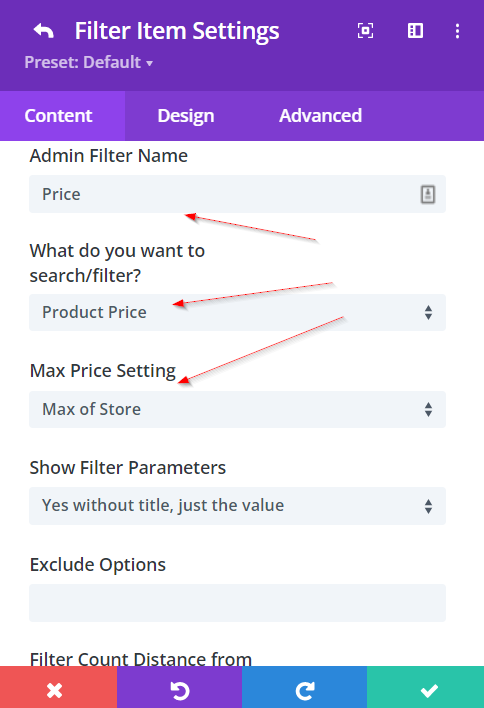
Add a new filter and customize it. Set the Admin Filter Name as something like Price, what you would like to filter as Product Price and the Max Price Setting as Max of Store. This is enough to get the Product Attribute filter working as long as you have set up the Archive Loop correctly.
Step 2: Define Range Filter Options
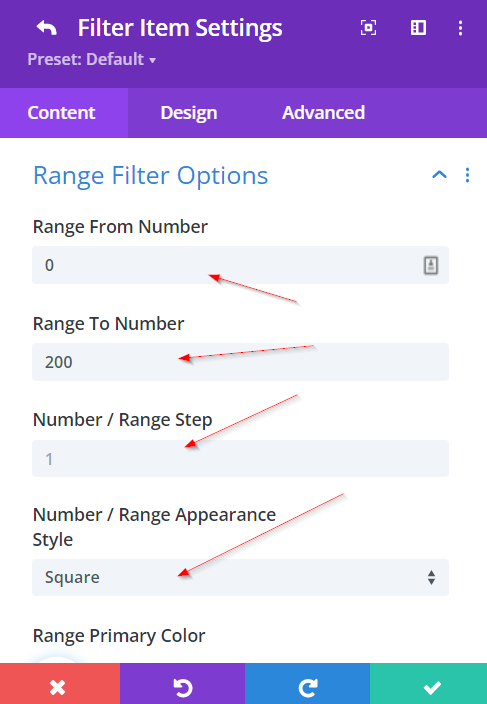
Customize your Product Price Filter further in the Range Filter Options section. Here you can set the min and max values, the style, colour and more.
Slider bounds and store values
The product price filter always uses a valid minimum and maximum from your store. The slider bounds are normalized so that the minimum is never greater than the maximum. This prevents the slider from appearing stuck at a single value when the page loads. Min and max are read and cached separately, so the displayed range stays correct even when store data or cache conditions would otherwise produce reversed or invalid bounds.
Click HERE to learn more about the Filter Posts Module.
What's Next
- Filter Posts Module — Module reference and range options
- How To Build A Product Price Filter - Demo — Step-by-step demo
- FAQ — Common questions and answers