Premade loop templates
Divi 5 only
Template options live on Archive Loop under loop style and template picker settings. See also Loop templates and layouts.
When to use premade templates
Premade templates suit quick launches, demos, and shop-style archives when you do not need a fully custom library layout yet. After Ajax filtering, the same template re-renders with the narrowed result set.
Enable a built-in template
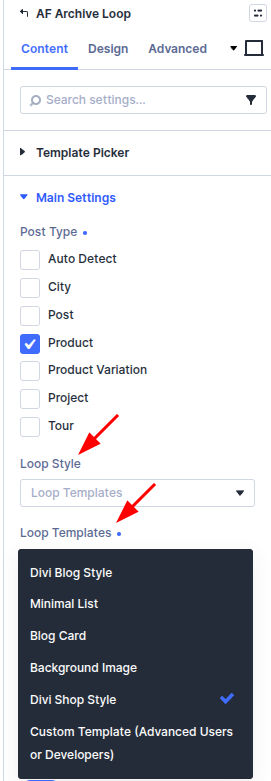
- Edit Archive Loop on the page.
- Set Loop style to use Loop templates (or the template picker flow in your build).
- Choose a built-in style such as blog, shop, or background-image variants where available.
- Open Loop template options for that style—ratings, price, cart buttons, excerpts, and similar toggles vary by template.
- Style typography and colors under Design → Loop template groups that match the selected template.
Import starter layouts
When your team ships JSON or library packs, import them into the Divi Library, then select the layout from Archive Loop instead of a built-in style. Imported layouts follow the same Ajax refresh behavior as built-ins.
Pair with filters
Match Post type on Filter Posts and Archive Loop. Product templates need a product loop; blog templates need posts. Point Target loop at the Archive Loop module visitors should refresh.