Catalog index
Configure the catalog under Divi Engine → Divi Ajax Filter → Catalog index. This is separate from the Auto suggest phrase index used for keyword suggestions while typing.
Purpose
The catalog index helps filter requests find matching posts and products faster. Instead of relying only on the default WordPress query path, you can resolve post IDs from a search engine first—then the Archive Loop or Loop Builder shows those results.
Use it when category counts, price filters, attribute filters, or text filters feel slow on large catalogs.
Catalog engines
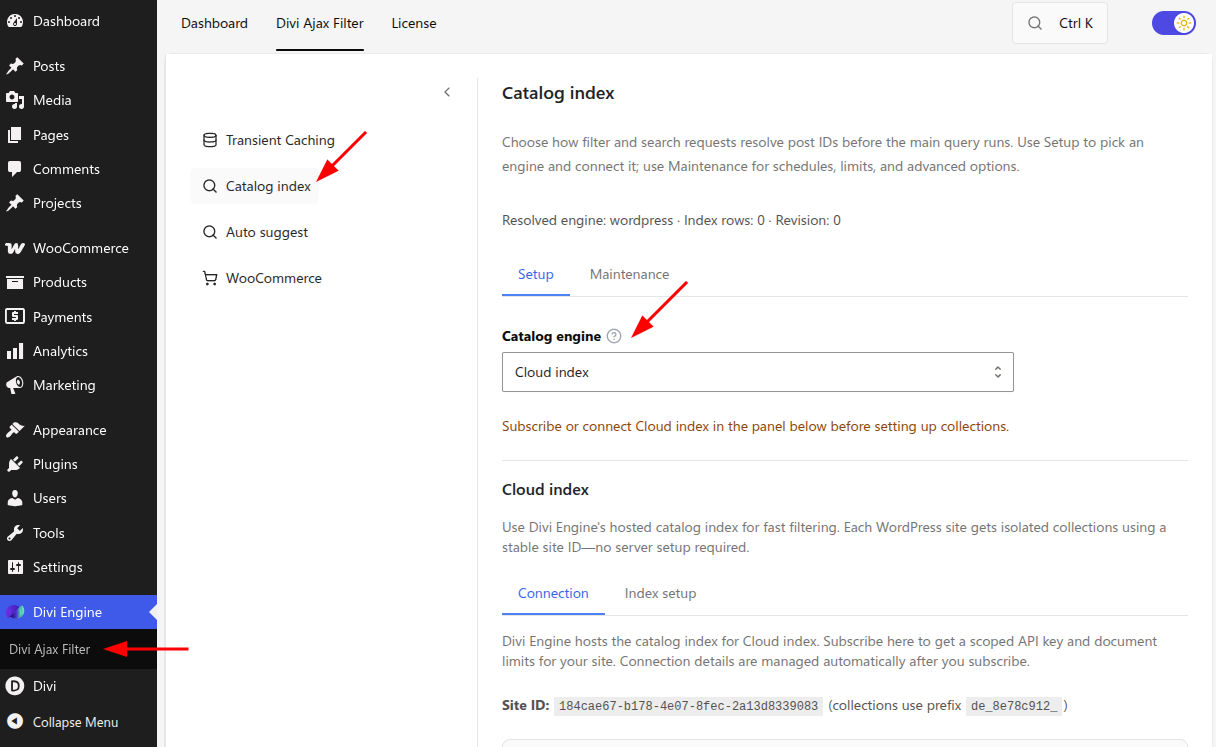
In Catalog index → Setup, choose a Catalog engine:
| Engine | When to use |
|---|---|
| WordPress (legacy WP_Query) | Default path. No index setup or maintenance. |
| Internal SQL index | Built-in local index on your site. Setup wizard, rebuild, and automatic updates when you save content. |
| Typesense | Self-hosted or managed Typesense. Per post type collections, schema wizard, and admin sync. |
| Cloud index | Divi Engine hosted search (trial, subscribe, and billing in settings). |
| Elasticsearch | Direct Elasticsearch index setup and sync (no ElasticPress required). |
External engines fall back to WordPress until connection and sync are complete.
Set up the catalog index
- Open Divi Engine → Divi Ajax Filter → Catalog index.
- Open the Setup tab and choose a Catalog engine.
- Save settings.
- Follow the engine panel that appears:
- Internal SQL index — Run the step-by-step setup (one profile per post type), then Rebuild internal index.
- Typesense / Elasticsearch / Cloud — Enter connection details, run Setup / Sync from the panel, and wait for progress to finish (for example
500/5000).
- Open Maintenance (shown when an engine other than WordPress is active) for schedules, limits, and advanced options.
If you add numeric or ACF range filters that should be indexed, re-run Setup and Sync (or rebuild the internal index) so those fields are available to the catalog.
What the catalog improves
- Faster matching for category, attribute, price, and text filters on Archive Loop pages.
- Faster category and attribute counts when using Typesense, Elasticsearch, or Cloud.
- The same catalog-powered filtering on Divi Loop Builder layouts when a catalog engine is enabled.
Maintenance options
On the Maintenance tab you can:
- Turn on Hybrid fallback to WordPress when the active engine cannot satisfy a filter state.
- Cap Maximum post IDs per request.
- Update index when content is saved so publish/update keeps the index in sync.
- Choose a Scheduled full rebuild (manual only, or daily via WordPress cron).
- Optionally Also sync Typesense / Elasticsearch on daily schedule.
- Enable rate limiting for public catalog-related filter requests.
Catalog index vs Auto suggest
| Catalog index | Auto suggest phrase index | |
|---|---|---|
| Settings tab | Catalog index | Auto suggest |
| Purpose | Faster filter matching and facet counts | Instant keyword suggestions while typing |
| Indexes | Posts/products for filters | Category/tag names and curated phrases |
| Required for | Large catalog performance | Auto suggest on Text Search |
You can use one without the other.
What's next
- Auto suggest — Phrase suggestions on Text Search fields
- Live search — Rich post/product dropdown (Divi Machine)
- Enable transient caching — Cache filtered results
- Ajax filter module behavior — Wire Filter Posts to your loop