Live search
Live search (post results) is a Divi Machine feature. Divi Ajax Filter alone includes Auto suggest and archive refresh while typing—not the rich post dropdown.
Purpose
Live search shows matching posts or products in a rich dropdown as visitors type. Results can include title, image, excerpt, price, result count, pagination, and optional Divi Library loop layouts.
Use it when shoppers should jump straight to a product or post from the search field. Use Auto suggest when you only need fast category/tag-style keyword hints.
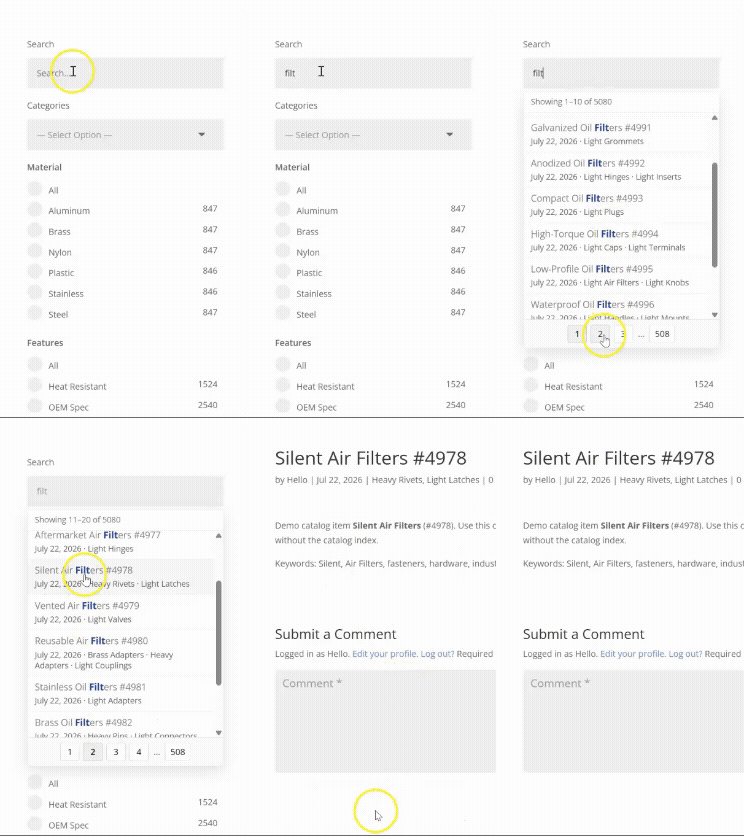
Where it appears
| Context | Behavior |
|---|---|
| Filter Posts → Text Search item | Rich dropdown under the field. Pair with Archive Loop if you also want the grid below to update. |
| Search Posts module (Machine) | Dropdown suggestions only. Use Filter Posts + Archive Loop if results should update on the same page below the field. |
| Site search forms (Machine setting) | Optional enhancement for Divi/theme search forms site-wide. |
Live search options for Text Search live on the Filter Posts Item (not on the parent Search Posts module).
Enable on Filter Posts (Text Search)
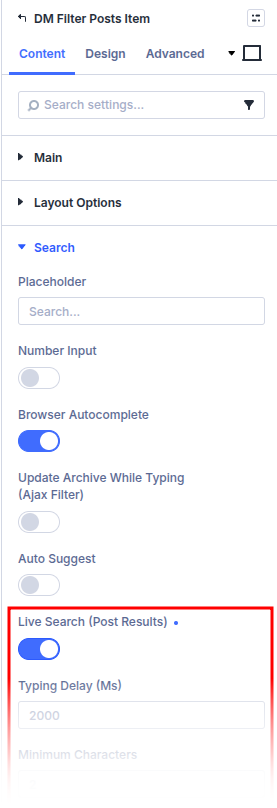
- Edit the page and open Filter Posts → Filter items → Text Search.
- In the Search section, turn on Live search (post results).
- Configure appearance and behavior:
| Setting | What it does |
|---|---|
| Typing delay (ms) / Minimum characters | When the dropdown starts fetching |
| Suggestions limit | Maximum results per request (1–15) |
| Suggestion click action | Fill only, fill and filter, or go to the result |
| Show image / title / excerpt / price | What each result row displays |
| Show result count | Result count in the panel |
| Enable pagination | Page through more results in the panel |
| Template style | Text list, Image and text, or Loop layout |
| Loop layout | Divi Library layout when template style is Loop layout |
| Show author / date / categories / tags / other taxonomies | Meta for built-in templates |
| Link term archives | Link taxonomy terms to their archives |
You can enable Auto suggest and Live search together. Phrase suggestions stay lightweight; Live search loads full post rows (and may be slower).
Machine plugin settings
Under Divi Engine → Machine Settings → Search settings:
| Setting | What it does |
|---|---|
| Allow live search for Search Posts modules | Site-wide kill switch for Search Posts module live search (on by default) |
| Enhance site search forms with live search | Optional: attach live search to matching Divi/theme search forms |
When enhancing site forms you can:
- Add Additional CSS selectors (one per line; defaults to forms with
role="search") - Include legacy theme search forms (wider match; use excludes if needed)
- Exclude containers (one CSS selector per line)
- Cap Maximum forms to enhance per page
Disable a specific form with data-dmach-live-search="off" on the form or the search field.
Also configure classic Machine search scopes (Use Divi Machine Search, common fields, ACF groups) so keyword search knows which fields to query.
Live search vs Auto suggest
| Auto suggest | Live search | |
|---|---|---|
| Data | Phrase index (categories, tags, curated phrases) | Live post/product search |
| UI | Lightweight phrase rows | Rich rows, optional count/pagination/layouts |
| Plugin | Ajax Filter (+ optional Machine) | Divi Machine required |
| Phrase index | Required (enable + rebuild) | Not required |
See Auto suggest for phrase index setup.
What's next
- Auto suggest — Fast phrase suggestions and index rebuild
- Catalog index — Faster filtered loops (separate from the dropdown)
- Filter item settings — Full Text Search options
- Common filter setups — Wire search to Archive Loop