Auto suggest
Auto suggest is configured on Filter Posts → Filter items → Text Search in the Divi 5 Visual Builder. Phrase indexing is managed under Divi Engine → Divi Ajax Filter → Auto suggest.
Purpose
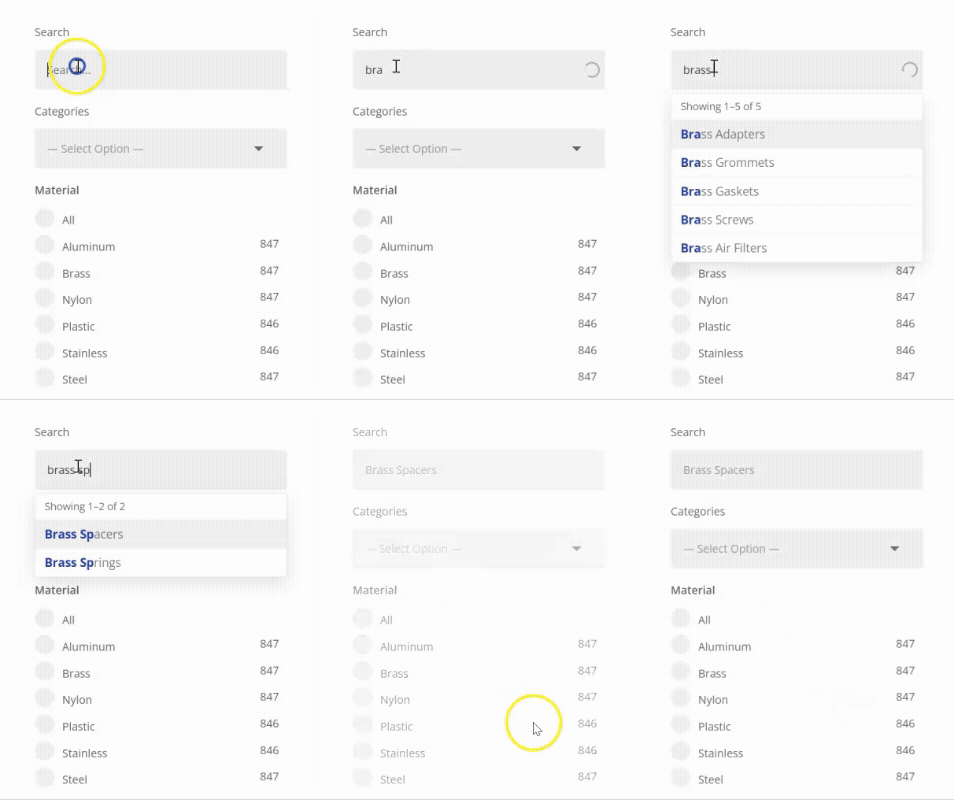
Auto suggest shows lightweight keyword suggestions while visitors type—such as product categories, tags, blog categories, and phrases you add yourself. It is built for quick matches without loading full post titles, images, or prices.
For rich post or product results in a dropdown, use Live search (requires Divi Machine).
How it works
-
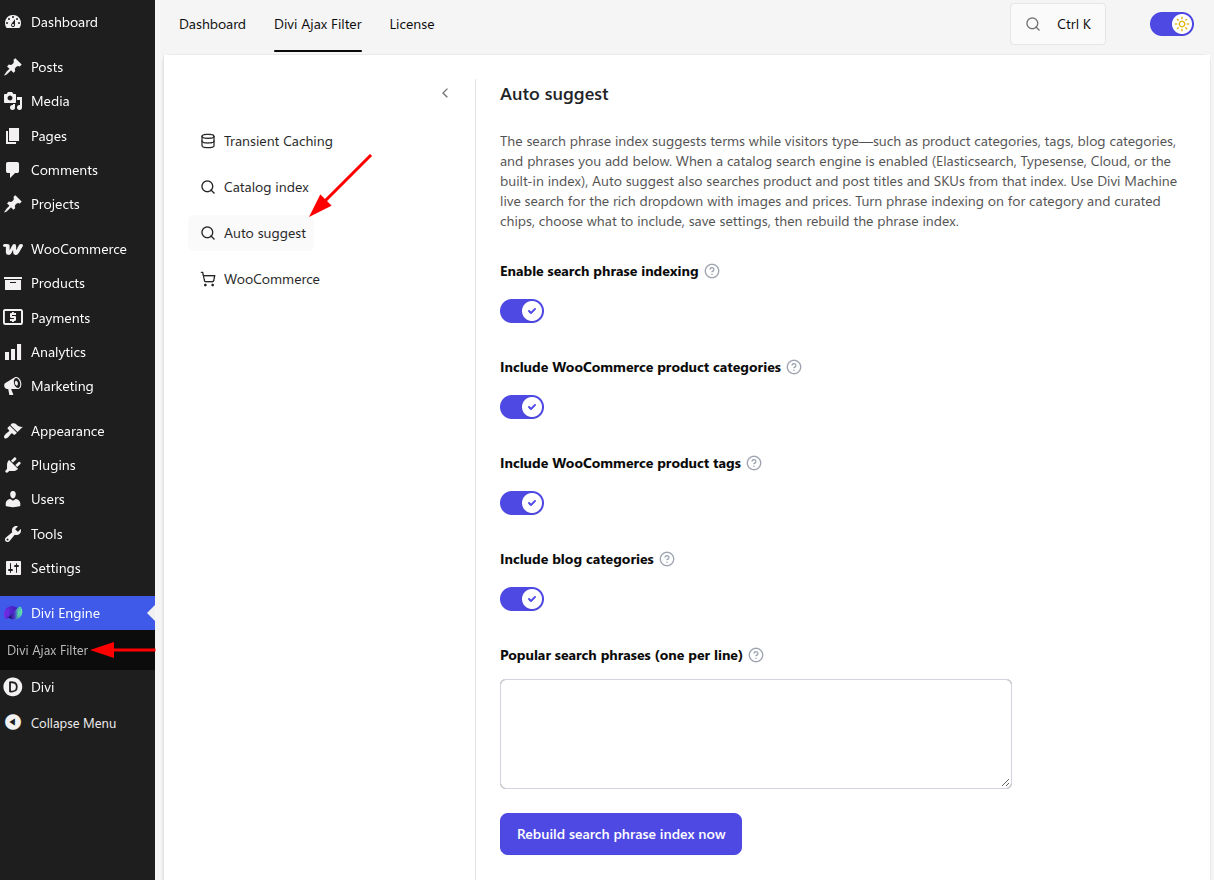
You enable the search phrase index in plugin settings and rebuild it.
-
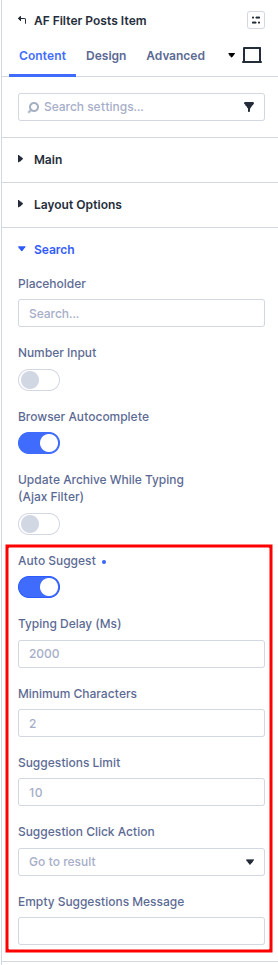
On a Text Search filter item, you turn on Auto suggest.
-
As visitors type, suggestions appear from the phrase index (up to five phrases by default).
Auto suggest does not list individual products or posts. That is what Live search is for.
Set up the phrase index
- Go to Divi Engine → Divi Ajax Filter → Auto suggest.
- Turn on Enable search phrase indexing.
- Choose what to include:
- Include WooCommerce product categories (on by default)
- Include WooCommerce product tags
- Include blog categories
- Optional: add Popular search phrases (one per line) for curated terms.
- Save settings.
- Click Rebuild search phrase index now and wait until it finishes.
The phrase index does not update automatically when you rename categories or edit curated phrases. After changing includes or the phrase list, save, then rebuild.
After updating from an older autosuggest version that indexed post titles, rebuild once—old title rows are not migrated.
Enable Auto suggest on a search field
- Edit your page in the Visual Builder.
- Open Filter Posts → Filter items and select (or add) a Text Search item.
- In Search settings, turn on Auto suggest.
- Adjust optional controls:
| Setting | What it does |
|---|---|
| Typing delay (ms) | Wait time after typing before suggestions run |
| Minimum characters | Start suggestions after this many characters |
| Suggestions limit | Maximum suggestions per request (1–15 in the builder; the server caps phrase suggestions at five) |
| Suggestion click action | Fill search only, Fill and filter, or Go to result |
| Empty suggestions message | Shown when nothing matches |
With Auto suggest only (no Live search), the default click action fills the field and filters the connected archive.
Related Text Search options
These work with or without Auto suggest:
| Setting | What it does |
|---|---|
| Browser Autocomplete | Allow the browser’s own previous-search suggestions (on by default). Turn off if unwanted history appears. |
| Update archive while typing (Ajax Filter) | Refresh the connected Archive Loop / loop while typing. Independent of suggestions. |
When only suggestions are enabled (not Live search), the archive no longer refreshes on every keystroke unless Update archive while typing is also on.
Auto suggest vs Live search vs Catalog index
| Feature | What visitors see | Needs |
|---|---|---|
| Auto suggest | Fast phrase suggestions | Phrase index enabled + rebuilt |
| Live search | Rich posts/products (title, image, price, pagination) | Divi Machine |
| Catalog index | Faster filter matching in the loop (not a dropdown) | Catalog engine in Ajax Filter settings |
You can combine Auto suggest and Live search on the same field when Machine is active—the dropdown can show Suggestions and Results together.
Ajax Filter without Machine
With Divi Ajax Filter alone you get:
- Auto suggest (after indexing)
- Update archive while typing
- Browser Autocomplete
Rich Live search (post results) appears only when Divi Machine is active.
What's next
- Live search — Post/product dropdown with Divi Machine
- Catalog index — Faster category, price, and text filters
- Filter item settings — Full Text Search reference
- Common filter setups — Search text recipe