Post Title Module
This loop module is for Divi 5 custom loop layouts. On Divi 4, use Post Title module under Divi 4 modules.
Overview
The Post Title module displays the title for each post or product in a loop layout. It provides control over the HTML heading tag for semantic structure, linking to single pages, and typography on the Design tab. Sections below follow the builder group titles (Content, Design, Advanced). Some fields only appear when Link Title to Single Page is enabled—as noted.
When to use it
Use this module as a component of a Custom Loop Layout that will be used inside the Archive Loop to dynamically display the title of each loop item. Custom loop layouts are saved in the Divi Library.
Common use cases:
- Display post titles in blog archive grids
- Show product names in WooCommerce shop layouts
- Create custom archive designs with proper heading hierarchy
- Build accessible loop layouts with semantic HTML
This module is not compatible with the Loop Builder.
Choose your heading tag carefully based on your page structure. If your main page title uses H1, use H2 or H3 for loop item titles to maintain proper heading hierarchy.
Content Tab
Text
Configure the heading tag, title source, and linking behavior.
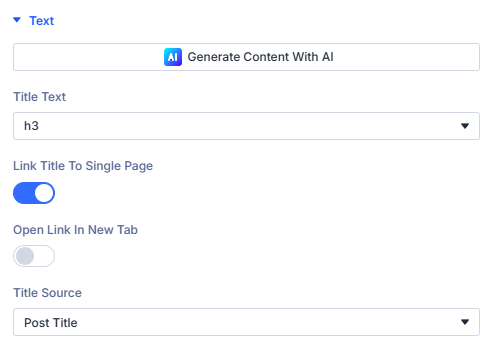
Title Text
Choose the HTML tag that wraps the title: h1 through h6, or p when the title should not be a heading.
Screen readers and search engines use heading order to navigate the page. Prefer h2 or h3 on archive layouts when the page already has an h1.
Link Title to Single Page
When enabled, the title links to the loop item’s single post or product page.
Open Link in New Tab
When: Link Title to Single Page is on. Opens the linked page in a new browser tab.
Title Source
- Post Title — Default; uses the post or product title.
- Category Title — Uses the category name (for example category loop layouts with Divi Machine or BodyCommerce).
Link
Standard Divi Link options for the title element when linking is configured.
Link URL
When: Divi link controls apply to the title output. Follows Divi link field behavior for the module.
Link Target
When: Available with Divi link options. Works with Open Link in New Tab on the Text group.
Background
Module-level background for the Post Title wrapper (Divi Background group on the Content tab).
Background Color
Solid background behind the title output.
Background Gradient
Gradient background for the module wrapper.
Background Image
Background image with standard Divi position, repeat, and size controls.
Background Video
Optional background video on the module wrapper when supported.
Admin label
Admin Label
Optional label in the Visual Builder layer list for this Post Title instance.
Design Tab
Typography and standard Divi wrapper styling for the title.
Title Font
Title Font
Font family, weight, style, size, letter spacing, line height, and related typography for the title text.
Standard Divi design groups
Module wrapper polish beyond Title Font.
- Sizing
- Spacing
- Border
- Box Shadow
- Filters
- Transform
- Animation
Use together to align gutters with sibling columns and motion preferences.
Advanced tab (standard Divi)
- Attributes — Custom data attributes safely merged.
- CSS (Custom CSS) — Targeted snippets.
- Conditions (Divi display conditions).
- Visibility — Responsive / scroll visibility toggles per Divi norms.
- Transition (Transition Group) — Motion curves for property changes when applicable.
- Position — Layering / anchors.
- Scroll — Effects tied to scrolling.
Consult Divi Advanced documentation when you need granular behavior beyond plugin filters.
What's next?
- Archive Loop module — Create loop layouts that use this module for each item title.
- Thumbnail module — Display featured images alongside titles in the same loop card.
- Filter Posts module — Add filtering on archive pages that feed the loop.