Account Page
What it is
The account area is where members see their plan, download invoices, update payment methods, switch plans, renew, or cancel. The plugin builds this for you; you only set the web address and how it looks.
Member account address (URL)
You choose the URL for the member area (it doesn’t have to be yourdomain.com/account).
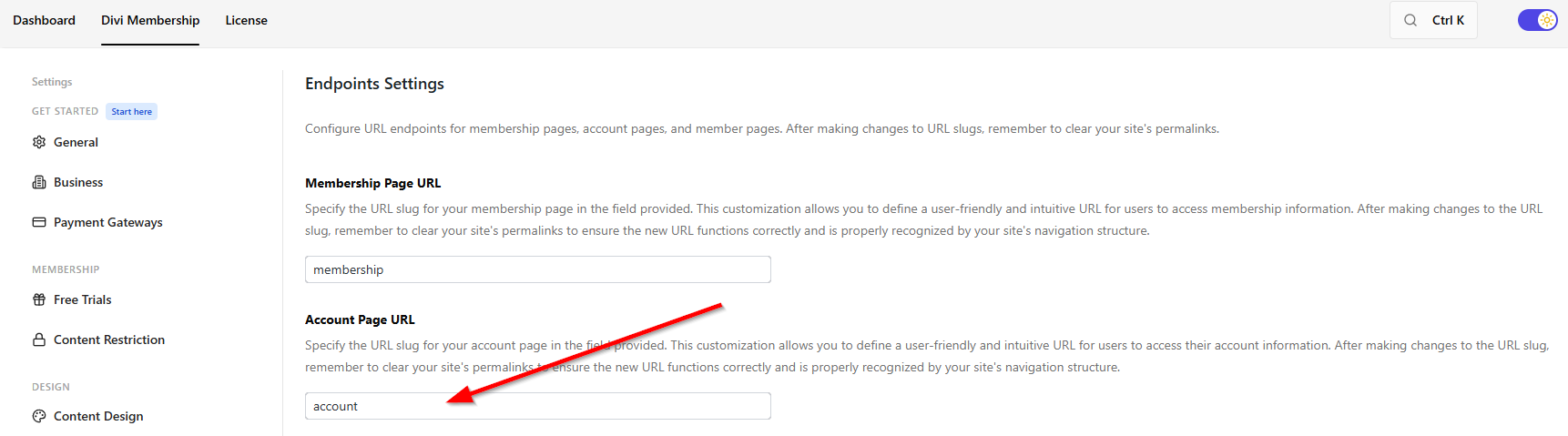
- Go to Divi Engine → Divi Membership → Endpoints.
- Set Account Page URL (e.g.
account). Members will useyoursite.com/account(or whatever you entered).
If the account page doesn’t load, go to WordPress → Settings → Permalinks and click Save so WordPress updates the links.
What members see in the account
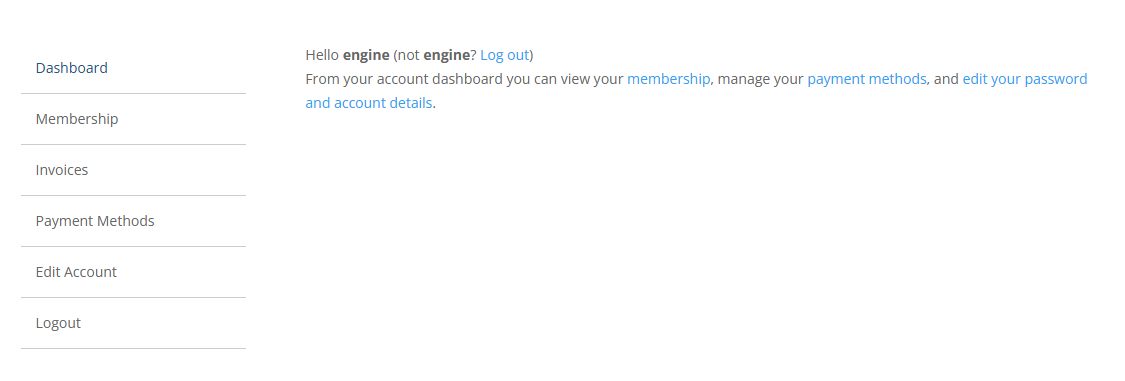
- Membership — Their current plan and payment info. They can cancel, switch plans (e.g. monthly to yearly, or to a different plan), resubscribe if they cancelled, and (with Stripe) add or remove saved cards.
- Invoices — Download PDF invoices for their payments. See Invoice generator to customize how invoices look.
- Payment methods — With Stripe, members can add a card, remove one, or set a default. With PayPal, they get a link to manage payment methods in their PayPal account.
- Edit account — Update name, email, address, and password.
Pending bank-transfer payment
A member who chose bank transfer sees Pending payment and the payment instructions from the gateway. Protected content remains locked until an administrator marks the subscription paid. The account does not show Renew, Switch Plan, or Retry because there is no card or remote payment agreement.
Changing how the account looks
Go to Divi Engine → Divi Membership → Account Design. You can style:
- Navigation — The account menu and layout.
- Content — Text and general look.
- Tables — How the membership and invoice lists look.
- Inputs — Form fields.
- Buttons — Buttons like Renew, Cancel, Switch plan.
Switching plans (upgrade, downgrade, change billing)
Members can change their plan or how often they pay (Stripe):
- Same plan, different billing — e.g. from monthly to yearly.
- Different plan — Upgrade or downgrade to another plan.
- You can choose which plans show when they click “Switch plan” so they only see the options you want.
Resubscribing and cancelling
- Resubscribe — If someone cancelled, they can click Resubscribe in the account to start again (same as renewing).
- Cancel — Members cancel from the account. You can show a message with a “Keep my membership” option so they can back out without cancelling.
- No card on file — Memberships assigned with Bulk Assign Offline / already paid can still be cancelled. Switch Plan, Renew, and Retry stay hidden because there is no card to charge.
Caching and Divi Nitro
Account and login responses depend on the current visitor. Divi Membership automatically asks Divi Nitro not to cache its account and login paths so one member's account state is not served to another visitor. Developers can add paths with the dmem_nitro_exclude_paths filter. If an account, login, or paywall looks stale, clear page/server/CDN caches and confirm those dynamic routes are excluded.
What's Next
- Invoice generator — Customize PDF invoices and design.
- Subscription management — Admin-side subscription actions and trial status.
- Settings — Where to find Endpoints, Account Design, and the rest of the settings.