Installation
Prerequisites and Versions
Before installing, ensure you have:
- WordPress — Current stable version
- Divi theme — Current version
- Divi Membership — Purchased from Divi Engine
Download and Install
- Log in to your Divi Engine account.
- Go to Downloads (or Orders → your Divi Membership order).
- Download the Divi Membership plugin package.
- In WordPress, go to Plugins → Add New.
- Click Upload Plugin, choose the downloaded file, then click Install Now.
- After the plugin is installed, click Activate.
tip
You can also upload the plugin via FTP or your host's file manager to wp-content/plugins/, then activate it from Plugins in WordPress.
License Activation
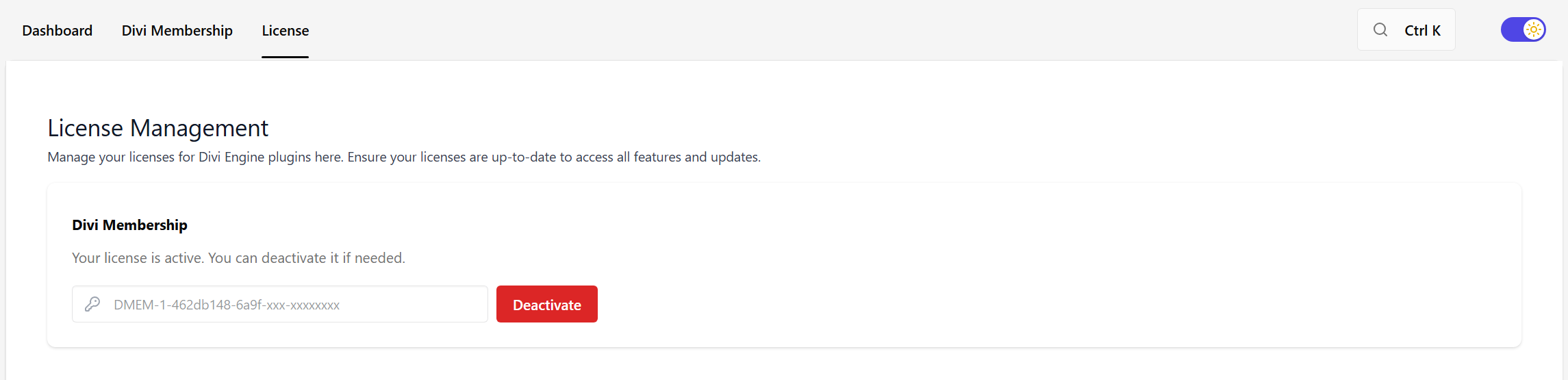
The license is set under Divi Engine → License (all Divi Engine product licenses are managed there), not on a separate legacy license page.
- Log in to your Divi Engine account.
- Go to Orders and open your Divi Membership order.
- Click Manage License.
- Generate a license key (or copy an existing one).
- In WordPress, go to Divi Engine → License.
- Find Divi Membership and paste the license key into the License field, then save.
Your license status will appear there. Keep your key private and do not share it publicly.
Verify Installation
After activation you should see:
- Divi Engine in the WordPress admin menu.
- Divi Engine → Divi Membership opens the plugin settings (General, Endpoints, Payment Gateways, and so on).
- Divi Engine → License is where you enter your license key for Divi Membership and other Divi Engine products.
If the menu or settings screen does not appear, confirm the plugin is active under Plugins and that your WordPress and Divi versions meet the prerequisites.
Next Steps
After installation you can:
- Create your first membership plan and billing cycle.
- Configure Divi Engine → Divi Membership → Content Restriction (e.g. enable Posts).
- Add a Register module to a page so users can sign up.
What's Next
- Quick Start — Build a working membership with one plan, content restriction, and a register form.
- Feature Overview — Plans, payments, trials, coupons, account, and reporting.
- Register module — Add signup forms to your pages.