Login Form
Divi 5 only
This reference is for Divi 5. The same module exists in the Classic Builder. See Login module on Divi 4.
Purpose and when to use
Login Form (divi-membership/login) is the front-end login form. Its Divi 5 module picker label is Login Form. Place it on the page chosen as Login Page under Endpoints. Logged-out visitors who open the account URL are sent to that page.
Add it from the Divi Membership folder in the Visual Builder.
Before you configure this module
- Divi Membership is active.
- You know where members should land after login: the account page, a profile page, another page, or a URL.
Quick setup
- Add Login Form.
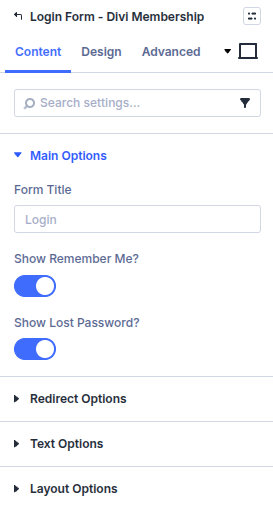
- Set Form Title (default Login).
- Leave Show Remember Me? and Show Lost Password? on unless you want those controls hidden.
- Set Redirect Type. Page is the default. Choose the account page, or use Account Page / Profile Page when those endpoints should receive the member.
- Adjust labels under Text Options if the defaults do not match your site.
Content tab
| Group | What it configures |
|---|---|
| Main Options | Title, remember me, lost password |
| Redirect Options | Where the member goes after login |
| Text Options | Username, password, remember me, lost password, and submit labels |
| Layout Options | Columns, labels, placeholders |
| Background / Link / Admin Label | Standard Divi groups |
Core settings
| Setting | Type | Default | Notes |
|---|---|---|---|
| Form Title | text | Login | Shown above the form |
| Show Remember Me? | toggle | On | Remember me checkbox |
| Show Lost Password? | toggle | On | Link to the WordPress password reset |
| Redirect Type | select | Page | Account Page, Profile Page, Page, or URL |
| Username Text | text | Username or email address | |
| Password Text | text | Password | |
| Remember Me Text | text | Remember Me | Shown when remember me is on |
| Lost Password Text | text | Lost your password? | Shown when lost password is on |
| Submit Button Text | text | Log in | |
| Form Columns | select | 1 | One or two columns |
| Enable Field Labels? | toggle | On | |
| Enable Field Placeholders? | toggle | Off | Uses the text options as placeholders |
Design tab
| Group | What it configures |
|---|---|
| Typography | Form Title, Labels, Remember Me, Lost Password, and Login Error |
| Fields | Background, hover, and focus colours, placeholder colours, field text, and field spacing |
| Login Button | Submit button styles |
| Inputs / Inputs Focus | Borders on the fields |
| Form Field Wrapper / Whole Module | Borders around the form and the module |
| Sizing, spacing, border, box shadow, filters, animation, transform | Module chrome |
Labels, Remember Me, and Lost Password typography appear only when those options are on.
Advanced
Standard Divi groups: attributes, CSS, conditions, visibility, transition, position, and scroll.