User List
Divi 5 only
This reference is for Divi 5. The same module exists in the Classic Builder. See User List on Divi 4.
Purpose and when to use
User List (divi-membership/user-list) shows a grid of WordPress users or members. Its Divi 5 module picker label is User List. Use a built-in loop template for a directory, or a custom loop layout that contains User Item modules.
Add it from the Divi Membership folder in the Visual Builder.
Before you configure this module
- Members exist if Display Type is Members or Show Members Only is on.
- For a custom layout, save a Divi Library layout that uses User Item and reads Current User (loop or single).
Quick setup
- Add User List.
- Leave Loop Style on Loop Templates and Loop Templates on Default Style, or switch to Custom Loop Layout and pick a library layout.
- Set Display Type: Default (users), Members, or Linked (an ACF Post Object or Relationship field on the current post).
- Set Grid Columns (default 4), tablet (2), and mobile (1).
- Set User Limit (default 10). Turn on Pagination under Load More / Pagination if the list is longer than one page.
Content tab
| Group | What it configures |
|---|---|
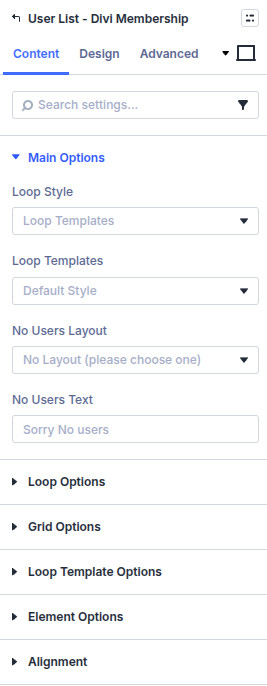
| Main Options | Loop style, empty state |
| Loop Options | Role, which users, limit, include and exclude, ACF filter, sort |
| Grid Options | Columns and gutter |
| Loop Template Options | Avatar, name, bio, badge, website, profile link. Shown for loop templates |
| Element Options | Pagination |
| Alignment | Button, image, and text. Shown for loop templates |
| Background / Link / Admin Label | Standard Divi groups |
Core settings
| Setting | Type | Default | Notes |
|---|---|---|---|
| Loop Style | select | Loop Templates | Or Custom Loop Layout |
| Loop Templates | select | Default Style | Custom Template is for a developer template |
| No Users Layout | select | none | A library layout, or text |
| No Users Text | text | Sorry No users | Used when no layout is chosen |
| User Role | select | None | Limit by role |
| Display Type | select | Default | Members asks for comma-separated plan IDs. Linked asks for the ACF field name |
| User Limit | text | 10 | Users per page |
| Sort Order | select | User Login | Includes display name, email, registered date, and user meta |
| Order | select | Ascending | |
| Show Members Only | toggle | Off | Active membership required |
| Grid Columns | select | 4 | Desktop. Tablet 2, mobile 1 |
| Enable Avatar | toggle | On | Size defaults to 200px |
| Enable Name | toggle | On | Name As defaults to display name |
| Enable Biographical Info | toggle | On | |
| Enable Badge | toggle | On | Plan badge from the membership Options tab |
| Enable Website | toggle | On | Link text defaults to Website |
| Enable Link to Profile | toggle | On | Text View Profile, shown as a button |
| Load More / Pagination | select | None | Pagination or none |
Specific Users and Exclude Users take comma-separated user IDs.
Custom Gutter Gaps defaults to off. When on, row and column gaps default to 25px.
Design tab
Shown for the loop template (not a fully custom layout you style inside the library layout):
| Group | What it configures |
|---|---|
| Loop Template Text | Name, bio, website, and profile link (when it is not a button) |
| Loop Template Profile Button | Button styles when View Profile as Button is on |
| Badge | Membership badge styles |
| Grid Item Border / Whole Module | Borders |
| Grid Item Box Shadow | Shadow on each card |
| Sizing, spacing, border, box shadow, filters, animation, transform | Module chrome |
Advanced
Standard Divi groups: attributes, CSS, conditions, visibility, transition, position, and scroll.