Catalog and auto suggest
Configure indexing under WordPress Admin → Divi Engine → Divi Ajax Filter.
This page covers the admin toggles. For feature-level behavior and when to use each engine, see Catalog index and Auto suggest.
Catalog index
Open the Catalog index section.
Setup
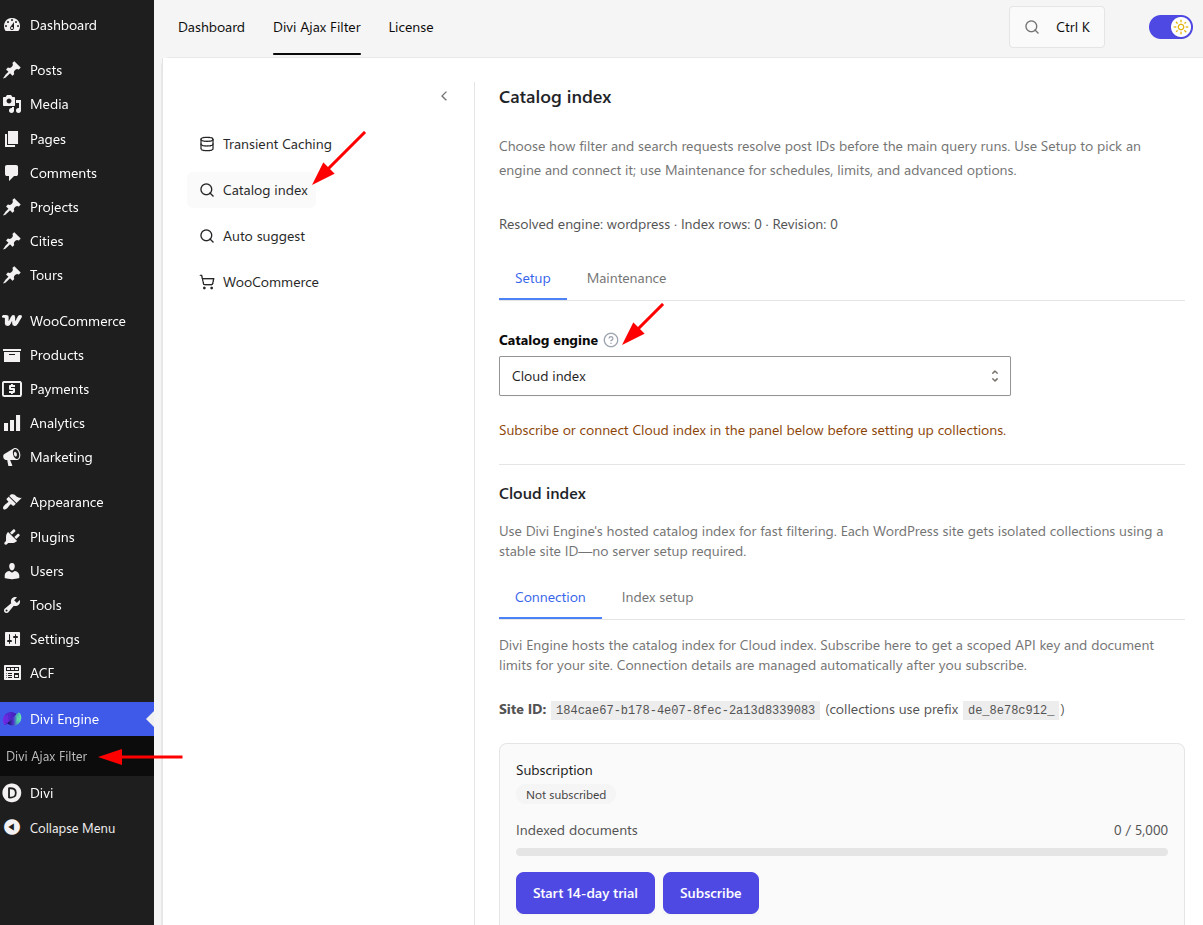
| Setting | Type | Default | What it does |
|---|---|---|---|
| Catalog engine | Select | WordPress (legacy) | Chooses how filter requests resolve matching post IDs: WordPress, Internal SQL index, Typesense, Cloud index, or Elasticsearch. |
| Rebuild internal index | Button | — | Rebuilds the local SQL index (Internal engine). Engine-specific wizards appear for Typesense, Cloud, and Elasticsearch. |
WordPress mode uses the standard query path and has no Maintenance tab. Other engines show Setup and Maintenance.
Maintenance
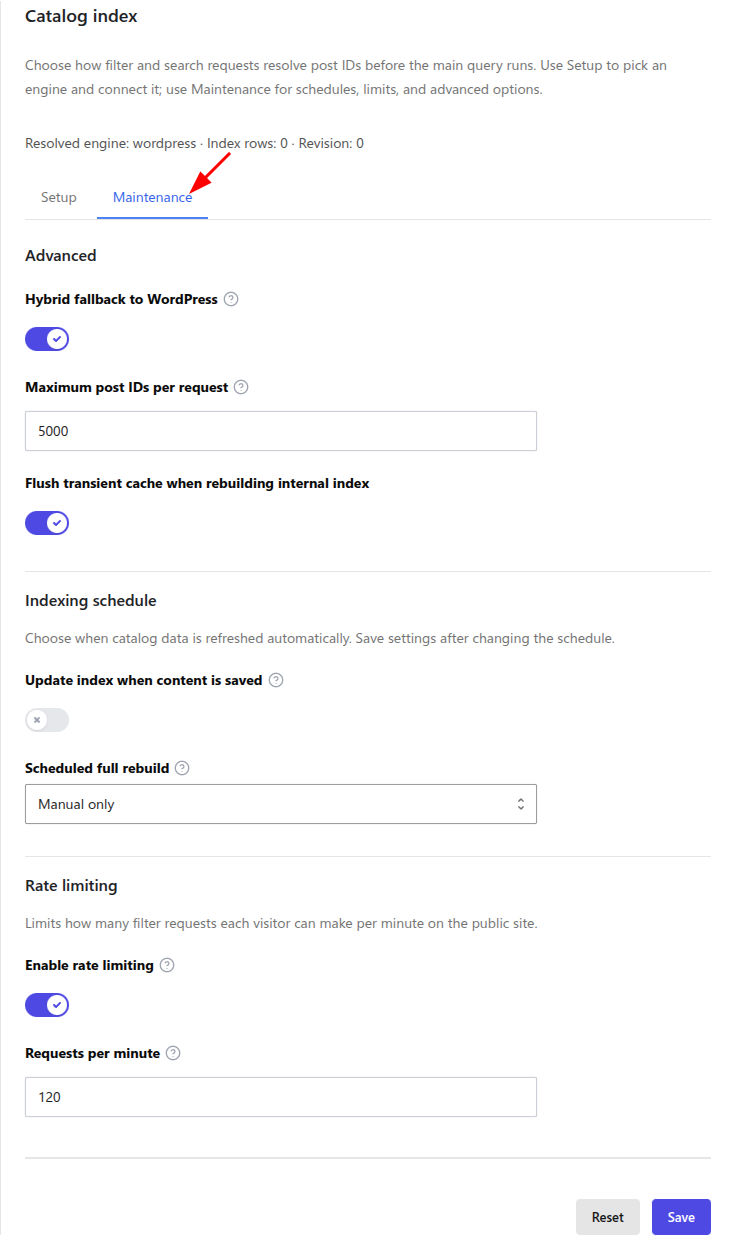
Maintenance appears when the engine is not WordPress.
Advanced
| Setting | Type | Default | What it does |
|---|---|---|---|
| Hybrid fallback to WordPress | Toggle | On (typical) | If the active engine cannot satisfy a filter state, fall back to the legacy WordPress query instead of returning no results. |
| Maximum post IDs per request | Number | Engine default | Caps how many IDs a catalog engine may return before the main query runs. |
| Flush transient cache when rebuilding internal index | Toggle | — | Clears filter transient cache after an internal index rebuild so visitors do not see stale ID sets. |
Indexing schedule
| Setting | Type | Default | What it does |
|---|---|---|---|
| Update index when content is saved | Toggle | — | Syncs the index when you publish or update posts and products. |
| Scheduled full rebuild | Select | Manual only | Manual only or Daily (WordPress cron) for a full rebuild. |
| Also sync Typesense / Elasticsearch on daily schedule | Toggle | — | When daily rebuild runs, also batch-sync external search profiles (shown when schedule is Daily). |
Rate limiting
| Setting | Type | Default | What it does |
|---|---|---|---|
| Enable rate limiting | Toggle | — | Limits public catalog-related filter requests per visitor IP. |
| Requests per minute | Number | — | Maximum catalog filter requests allowed per IP each minute. |
Auto suggest
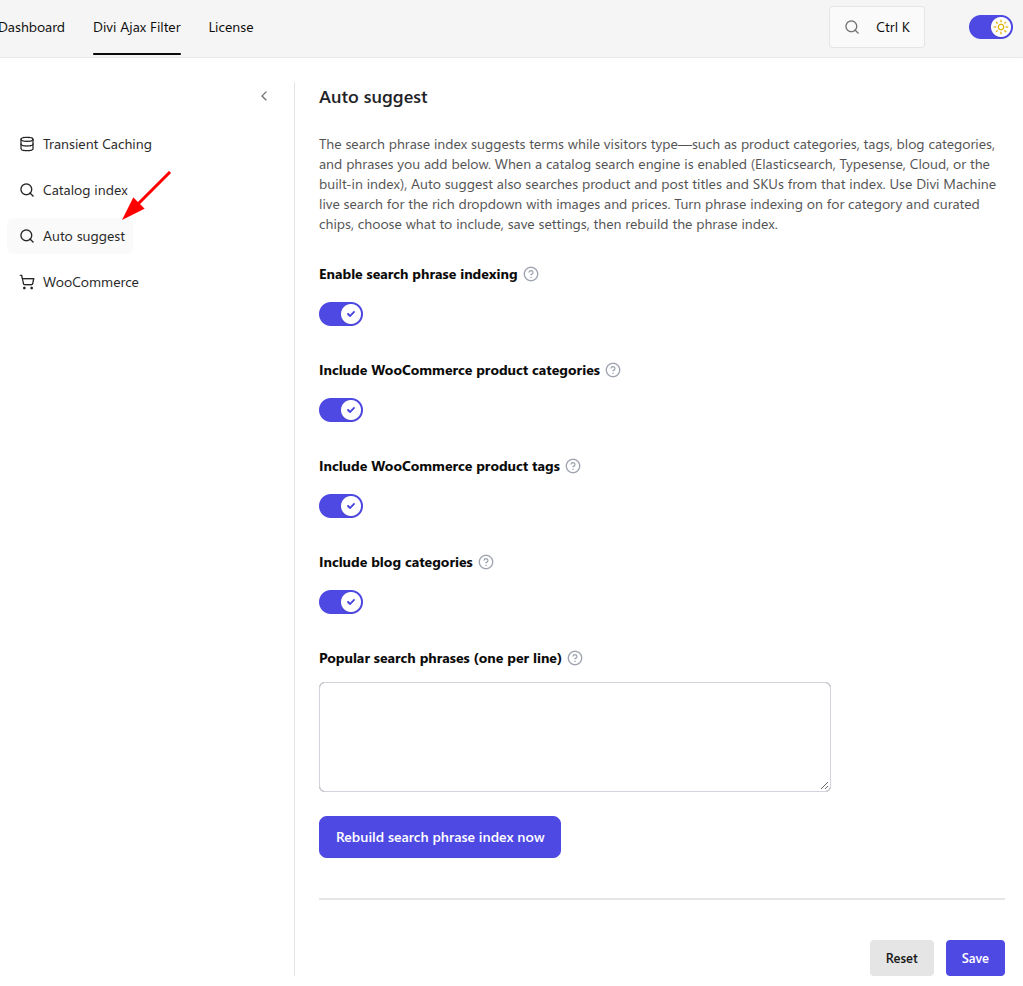
Open the Auto suggest section. This phrase index powers keyword suggestions on Text Search filter fields. It is separate from the catalog engine and from Live search (which requires Divi Machine).
| Setting | Type | Default | What it does |
|---|---|---|---|
| Enable search phrase indexing | Toggle | — | Turns on the lightweight phrase index used for Auto suggest. |
| Include WooCommerce product categories | Toggle | — | Indexes published product category names. |
| Include WooCommerce product tags | Toggle | — | Indexes published product tag names. |
| Include blog categories | Toggle | — | Indexes published post category names. |
| Popular search phrases (one per line) | Textarea | — | Optional curated phrases. Rebuild after editing. |
| Rebuild search phrase index now | Button | — | Rebuilds the phrase index immediately. |
After you change sources or curated phrases, click Rebuild search phrase index now, then test a Text Search field with Auto suggest enabled.
What's Next
- Catalog index — When to use each engine
- Auto suggest — Text Search suggestion behavior
- Caching and performance — Transient cache and layout mode
- Stale or wrong results — Rebuild and clear cache when results look wrong