Post Meta
Post Meta is a parent module. Add one or more Post Meta Item children; each child renders a single meta line (date, author, categories, tags, or custom taxonomy).
Overview
Typical uses: byline inside a custom loop layout, linked category lists on archive cards, or custom taxonomy chips next to the title.
How to use Post Meta
- Add Post Meta inside a loop card or single template.
- Optional: enable Display Inline and set a Separator between meta items.
- Add Post Meta Item children for each line you need.
- On each child, choose the meta type and label/link/icon options.
- Style title, meta item, label, and link groups under Design.
Parent: Post Meta
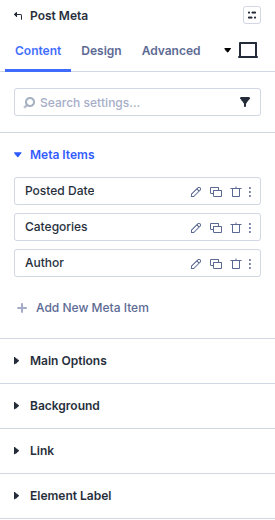
Meta Items
Add Add New Meta Item children and reorder them.
Main Options
Display Inline
Place multiple Meta Item rows on one horizontal line instead of stacking.
Separator between meta items
Optional text between items (for example | or •). Leave empty to rely on spacing only.
Design
- Design → Title, Meta Item, Label, and Link (not button) — Set typography for the parent module and its inline/list output.
- Design → Border and Box Shadow — Style the overall Post Meta wrapper.
Use the child Design settings below when one item needs different typography or renders its value as a button.
Child: Post Meta Item
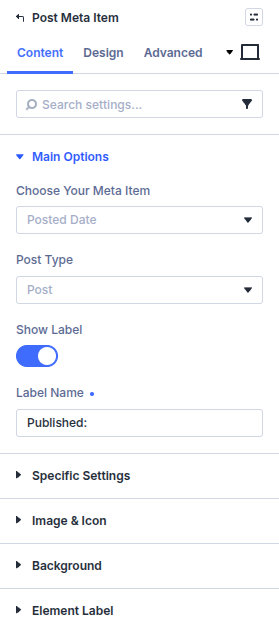
Main Options
Choose Your Meta Item
Posted Date, Author, Categories, Tags, or Custom Taxonomy (then set taxonomy and post type as needed).
Exclude Categories (slug) / Categories to show
Omit category slugs or limit to all / parents only / children only.
Category Sort By / Category Sort Order
Order terms by name, slug, term ID, count, or term order, ascending or descending.
Show Label / Label Name
Optional prefix label before the value.
Link Items
Link terms or author where supported.
Specific Settings
Show values as buttons, one value per line, custom post date format, item separator, prefix, and text before the value.
Image & Icon
Use icon or custom image before/after the meta value, with placement and sizing options.
Element Label
Accessibility / element label when needed.
Design
- Design → Meta Item, Label, and Link (not button) — Override typography for this child item.
- Design → Button - Meta Value — Style values rendered as buttons after enabling the button option under the child's Content settings.
- Design → Border and Box Shadow — Style the individual child wrapper.
Standard Divi sizing, spacing, filters, transforms, and animation remain available on the parent and child modules.
Pitfalls and limits
- Inside Archive Loop cards, each item reads the card post—confirm you are not editing a Theme Builder layout post’s meta by mistake.
- Custom taxonomy must be attached to the post type you are looping.
What's Next
- Custom Field Item — Custom field values beyond core meta
- Post Content — Body and excerpt
- Custom loop layouts — Card templates
- Module overview — All Machine modules