Category Loop
Category Loop outputs terms from a taxonomy (categories, tags, or a custom taxonomy) as a grid, list, or Divi Library Loop Layout. Use it for directory landing pages, subcategory indexes, and term navigation.
Overview
Typical uses: show all brands for a CPT, list child categories of the current term, or build a visual taxonomy grid with ACF term images.
How to use Category Loop
- Add Category Loop to a page or Theme Builder layout.
- Under Loop Options, set Taxonomy, Post Type, and Layout Style.
- Optional: choose a Loop Layout from the Divi Library for full card control.
- Configure parents/children, empty terms, excludes, and ordering.
- Style titles, descriptions, borders, and overlays under Design.
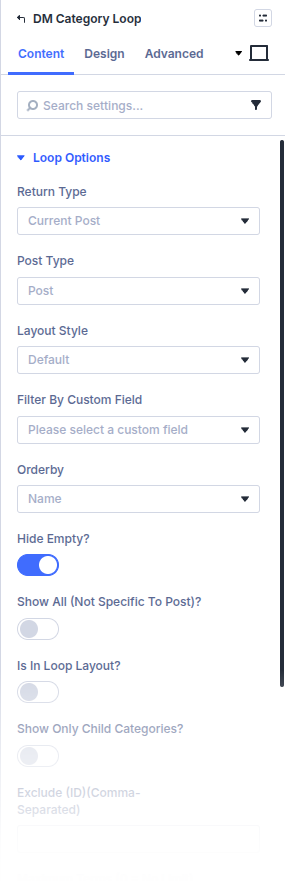
Loop Options
Return Type / Taxonomy / Post Type
Choose which taxonomy and related post type define the term set.
Layout Style / Loop Layout
Use a built-in grid/list presentation or a custom Divi Library layout for each term.
Link to Category Items?
Make term cards link to the term archive.
Filter By Custom Field / Custom Field Value
Limit terms using a custom field condition when needed.
Orderby
Sort terms (name, count, and other supported orderby values in the builder).
Hide Empty? / Show All (not specific to post)?
Control whether empty terms appear and whether the list is global or scoped to the current post’s terms.
Show Parents Only? / Show Only Child Categories? / Is in loop layout?
Hierarchy helpers for parent-only lists, children of the current term, and nested use inside another loop layout.
Exclude (ID) / Maximum terms
Comma-separated term IDs to omit; 0 means no max limit.
Layout, grid, and list options
- Layout Options — grid layout style, image field name/return format, column style, title HTML tag, text orientation, hide titles/descriptions, show term count
- Grid Options — desktop/tablet/mobile column counts
- List Options — parent and child list padding
Design
- Design → Title, Active Title, and Description — Set typography for term names, the active/current term, and descriptions.
- Design → Overlay — Choose the zoom icon, icon color, and hover overlay color used on term images.
- Design → Individual Categories Borders / Box Shadow — Style each term card. Use the separate All Borders / Box Shadow groups when you want to style the overall loop wrapper instead.
Standard Divi sizing, spacing, filters, transforms, and animation remain available for the module.
Pitfalls and limits
- After Divi 5 migration, re-save Divi Library layouts that embed Category Loop if you see raw shortcode—see Divi 5 Migration Tool.
- Term image fields must exist on the taxonomy and match Image Name / return format.
What's Next
- Custom loop layouts — Build term cards in the Divi Library
- Add/Edit Taxonomies — Register taxonomies in Machine
- Examples: subcategories in a loop — Subcategory pattern
- Module overview — All Machine modules