Post Content
Divi 5 module
Post Content outputs the current post’s editor content, excerpt, or a taxonomy description—with optional word limits and a read more link. Use it in custom loop layouts and Theme Builder bodies.
Overview
Use Content for full (or truncated) post body, Excerpt for archive cards, and Taxonomy Description on term archives or Category Loop cards when the context is a term.
How to use Post Content
- Add Post Content to a loop layout or template.
- Set Content Type.
- Optional: set word counts and Show Read More Link.
- Style content text, lists, quotes, and headings under Design.
Main Options
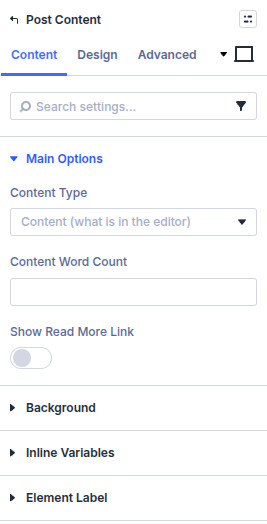
Content Type
- Content (what is in the editor) — post content
- Excerpt — post excerpt
- Taxonomy Description — term description in taxonomy context
Excerpt Word Count / Taxonomy Description Word Count / Content Word Count
Limit length for the selected type. Leave unset or at defaults when you want the full text.
Show Read More Link / Read More Text
Append a read more link with custom label when truncating.
Design
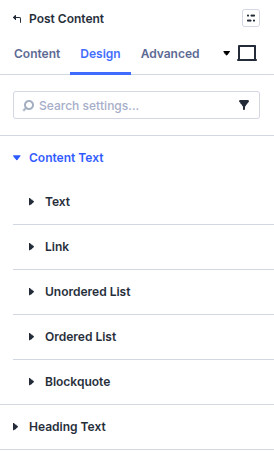
- Design → Content Text — Style body text and links, unordered and ordered lists, and blockquotes. Quote controls include the quote border weight and color.
- Design → Heading Text — Set typography independently for H1 through H6 headings rendered inside the content.
Standard Divi sizing, spacing, borders, filters, and animation remain available. The optional read-more output follows the content/link styling rather than having a separate Machine design group.
Pitfalls and limits
- In loop cards, content comes from the card post, not the Theme Builder layout post.
- Taxonomy description only populates when the query context is a term (or a layout that provides term context).
- Very large untruncated content in tight cards will hurt layout—prefer excerpt + word count on archives.
What's Next
- Post Meta — Author, date, and terms
- Custom Field Item — Custom field values
- View Post Button — Link or modal to the single
- Custom loop layouts — Card templates