How to Display your Wishlist (or Dislike) Posts
Showing a saved list uses Divi Machine Archive Loop. On Divi 5, set Relationship Type to Saved List (Machine Account), then choose Saved list type. On Divi 4, set Post Display Type to Saved List (Machine Account), then Choose saved type.
The icon saves the post. This loop displays it. List names come from Main settings → Types of saved objects.
Dislike names are for Acc Wishlist Icon, not a separate Archive Loop display type. Only saved lists selected in Saved list type are displayed by this setup.
Divi 5
- Edit the account page (or other template) in the Visual Builder.
- Add Archive Loop.
- Choose the post type visitors can save.
- Open Content → Loop Options → General.
- Set Relationship Type to Saved List (Machine Account).
- Set Saved list type to the list, for example wishlist.
Archive Loop reference: Archive Loop (Divi 5).
Divi 4
- Edit the layout in the Classic Builder.
- Add Archive Loop.
- Under loop options, set Post Display Type to Saved List (Machine Account).
- Set Choose saved type to the list you want to show.
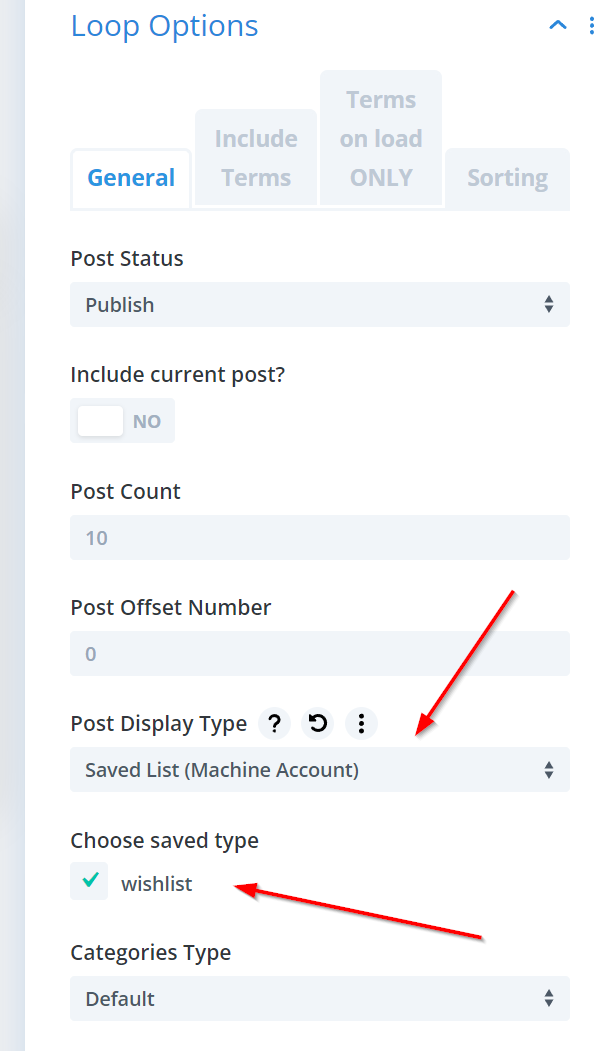
The screenshot above is the Divi 4 module. Archive Loop reference: Archive Loop (Divi 4).
The loop shows posts for the visitor who is logged in. Put it on an account page if it should sit with the rest of the account area.
What's next
- Wishlist Icon — The control that adds and removes posts.
- Main settings — Saved-list names and Add to ONLY one.