Main Settings
Open WordPress Admin → Divi Engine → Divi Machine Account → Main settings. These options are the same on Divi 5 and Divi 4.
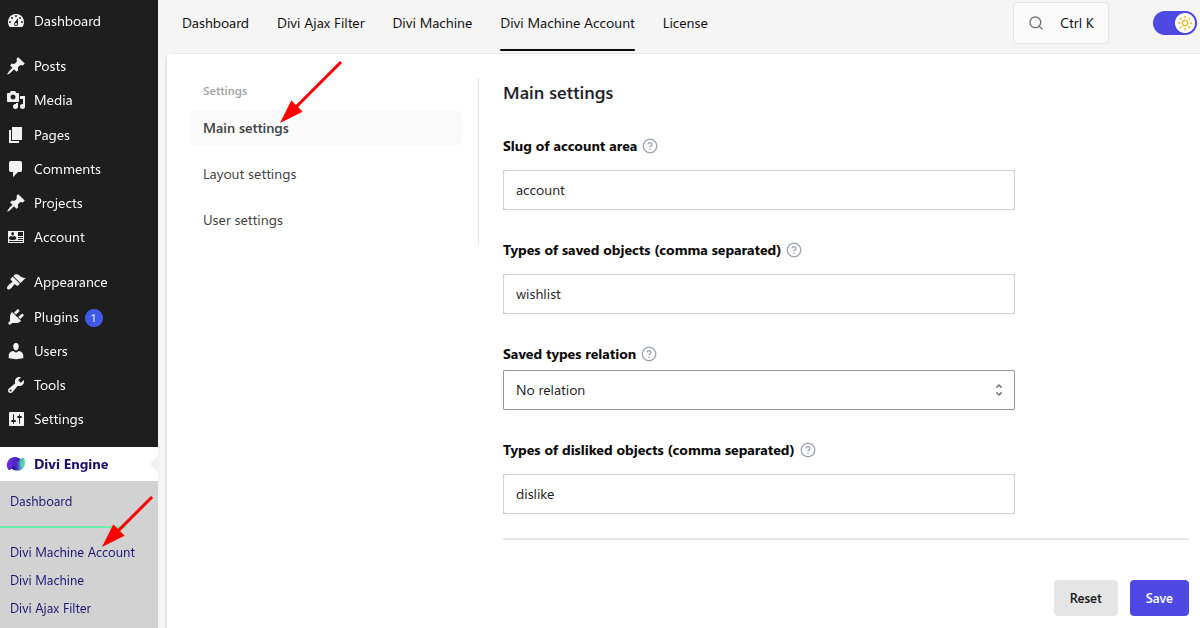
Slug of account area
This is the URL path for the account area. The default is account, so the area is available at /account/.
After you save, including when you keep the default slug, go to Settings → Permalinks and click Save Changes. If the account URL is still a 404, click Save Changes a second time.
If another plugin already uses the same path, choose a different slug so the two areas do not share a URL.
Types of saved objects (comma separated)
These are the saved-list names, such as a wishlist. The default is wishlist.
To offer more than one list, separate the names with commas, for example wishlist, applied, paid. Each name is stored as a WordPress key: letters are lowercased, spaces become hyphens, and unsupported characters are removed. Acc Wishlist Icon and Archive Loop can only use names you enter here.
Saved types relation
This applies when you have more than one saved list.
| Option | What happens |
|---|---|
| No relation | A post can sit on more than one saved list at the same time. This is the default. |
| Add to ONLY one | Adding a post to one saved list removes it from the other saved lists. Adding it to a dislike list also removes it from the saved lists. |
Types of disliked objects (comma separated)
These are the dislike-list names. The default is dislike. Separate extra names with commas.
Use these names on Acc Wishlist Icon when Choose the type is Dislike Type. Dislike lists control the icon state; they are not a separate Archive Loop display type.
What's next
- Layout settings — Navigation, dashboard, and login posts.
- Notifications, Profile, Messages, and Search alerts — Optional account features. Notifications, messages, and search alerts stay off until you turn them on.
- Wishlist Icon — The icon that writes to these lists.