View Post Button
View Post Btn adds a button or link to the current post in a loop or template. It can open the single URL, an external URL from a custom field, a modal, or update content in a wrapper on the same page.
Overview
Use it on custom loop cards for “Read more”, quick-view modals, or same-page detail panels. Related features: Post modal, Same page post detail.
How to use View Post Button
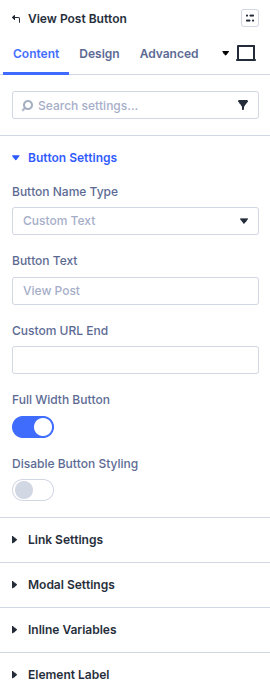
- Add View Post Btn inside a custom loop layout or single template.
- Set Button Name Type (custom text or custom field) and label.
- Choose link behavior (new tab, external field URL) under Link Settings.
- Optional: enable Show Post in Modal/Update Content and pick modal vs update-content mode, layout, and chrome.
- Style the button under Design.
Button Settings
Button Name Type
Custom Text or Custom Field for the visible label.
Button Text / Custom Field Name
Static label or field that supplies the label.
Custom URL End
Optional path suffix appended to the post URL when needed.
Full Width Button / Disable Button Styling
Layout and whether Machine button styles apply.
Link Settings
Open in New Tab
Open the destination in a new tab.
Open to External Site / External Custom Field (Text)
Use a text/URL custom field as the href instead of the single post permalink.
Modal Settings
Show Post in Modal/Update Content
Enable modal or same-page content update instead of a normal navigation click.
Post Type
Post type context for loading modal/update content (or detect automatically when offered).
How do you want to display the post content?
Modal Pop up or Update Content.
Position of content
Above/below the Archive or Carousel module, or Show Content in the Content Wrapper with a Content Wrapper Selector (CSS class/ID).
Show First Post on Page Load
When using update-content, optionally load the first post into the wrapper on page load.
Modal / Content Loop Layout
Divi Library layout used inside the modal or content wrapper.
Modal Style / overlay / close icon / next & previous
Center or side modal, overlay background, close icon color/size, and optional previous/next post controls with icon styling. Loading Post Animation Color styles the loading state.
Design
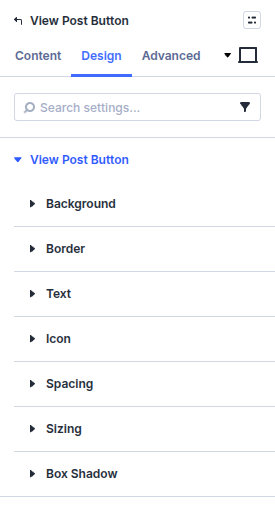
- Design → View Post Button — Use Divi's button controls for the text, colors, icon, and other button styling. Button alignment is controlled by the module's layout/content settings rather than this group.
- Design → Border and Box Shadow — Style the module/button wrapper independently from the modal chrome configured under Modal Settings.
Standard Divi spacing, filters, transforms, and animation remain available. The modal overlay, close icon, previous/next controls, and loading color are configured in the modal settings described above.
Pitfalls and limits
- Modal/update-content needs a valid Modal / Content Loop Layout.
- Content wrapper selector must match an element on the same page.
- External URL fields must contain a full URL or the link will break.
What's Next
- Post modal — Modal feature guide
- Same page post detail — On-page detail pattern
- Custom loop layouts — Cards that include this button
- Module overview — All Machine modules