Post Title Module
Use Post Title inside Custom Loop Layouts or single post templates so each item renders its own title with correct semantics.
Overview
The Post Title module prints the current loop item’s title. You control the HTML tag for accessibility, optional linking to the single, and Visual Builder preview content.
When to use it
- Card headings inside a Custom Loop Layout
- Taxonomy loops where Get Title From is set to Taxonomy Title (see Category Loop workflow)
- Single templates when you want Machine-driven title output instead of static text
Builder placement
- Open the Divi Library layout or Theme Builder template you are editing.
- Insert Post Title where the heading should appear inside the loop or body area.
- Expand each setting below to match the labels in the Content tab groups. Font styling is on the Design tab.
Content — Post Title
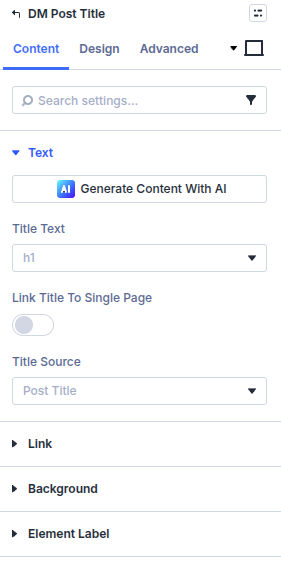
Title HTML Tag
Choose h1–h6 or p so archive and single pages keep a sensible heading order.
Link Title to Single Page
Wrap the title in a permalink to the post or product detail view.
Open in New Tab
Opens the linked single in a new tab when linking is enabled.
Content — Visual Builder
Visual Builder Post
Pick which post supplies preview data while you design inside the builder.
Design
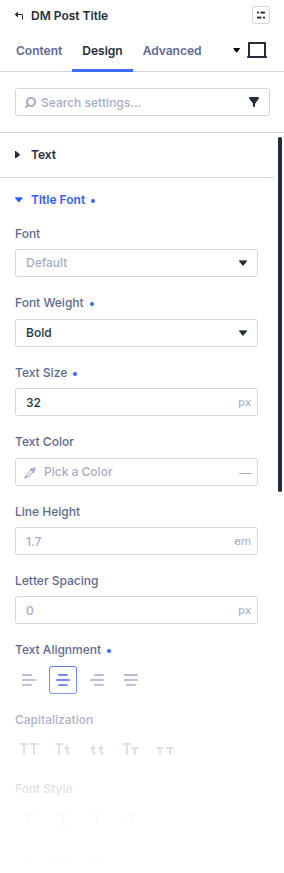
Customize typography under Design → Title Font (family, size, weight, color, and related font options). Other Design groups (spacing, borders, and similar Divi defaults) stay available if you need them; this page does not list every field.
What is next
- Thumbnail module — Pair title with imagery
- Custom loop layout — Author the surrounding layout