General Payment Settings
General payment settings are configured in WordPress admin, not in the Visual Builder. They apply to all forms that use payments.
Prerequisites
Before you configure payment settings:
- Enable HTTPS on your site.
- Create Stripe and/or PayPal developer accounts.
- Gather both test and live credentials.
- Confirm your account supports your intended currency.
Where to find it
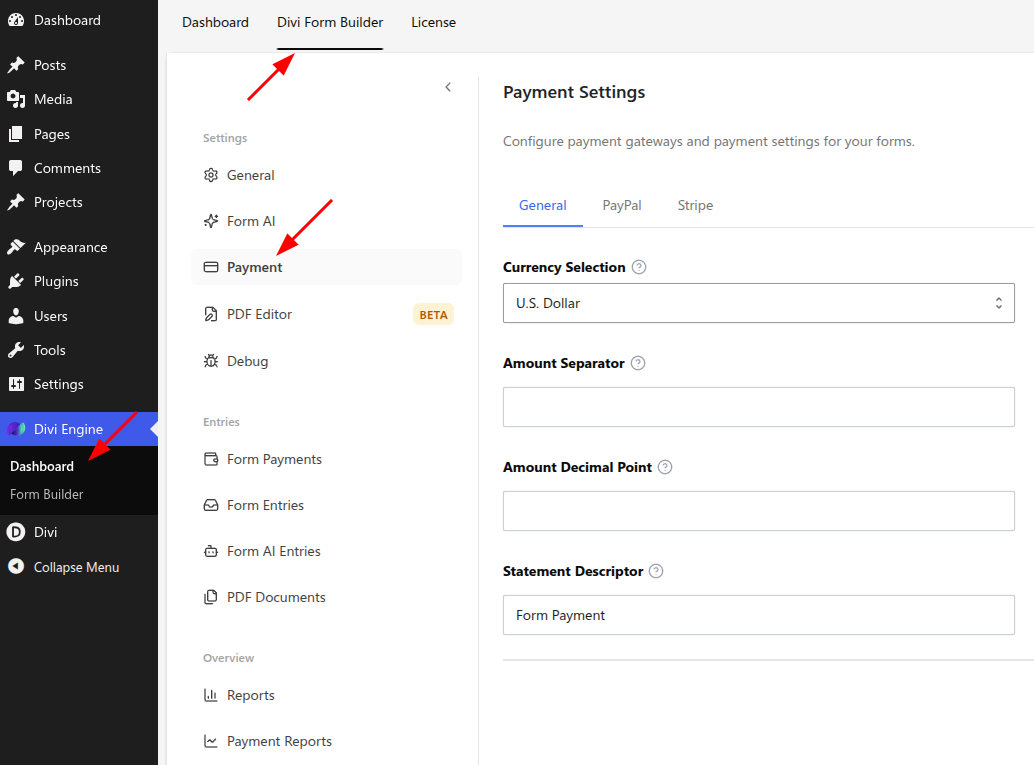
In WordPress admin:
- Go to Divi Engine → Form Builder.
- In the sidebar, under Settings, select Payment.
The page heading is Payment Settings. Use the General, PayPal, and Stripe tabs.
What you can configure
- Payment gateway — Choose Stripe or PayPal (or both; form-level settings choose which to use).
- Currency — Default currency for payment amounts.
- Test mode — Use sandbox/test keys for Stripe or PayPal.
- Stripe — Publishable and Secret keys (test and live).
- PayPal — Client ID and Secret from the PayPal Developer Dashboard; use Sandbox for testing and Live for production.
After saving, enable payments on individual forms in the Visual Builder Form module and set the price/payment options there.
Recommended setup checklist
- Select your default currency.
- Add Stripe and/or PayPal test credentials.
- Enable test mode and save.
- Run at least one successful test transaction.
- Replace test credentials with live credentials before launch.
- Disable test mode and re-verify with a low-value live transaction.
Verify it works
Use this quick verification list:
- Settings save without validation errors.
- Gateway test transaction succeeds.
- The same gateway appears correctly in the form module payment options.
- Transaction records appear in your gateway dashboard.
Common issues and fixes
- Invalid API key/secret: copy values again and remove extra spaces.
- Wrong environment: do not mix test keys with live mode (or live keys with test mode).
- Payment method not shown on form: verify form-level payment settings are enabled.
- Checkout blocked on browser: disable conflicting cache/minification for checkout scripts and retest.
What's Next
- Form payments - complete per-form payment setup.
- Email notification - confirm payment-related notifications.
- Spam protection - add abuse protection for paid forms.