Layout Settings
Open WordPress Admin → Divi Engine → Divi Machine Account → Layout settings. These options are the same on Divi 5 and Divi 4.
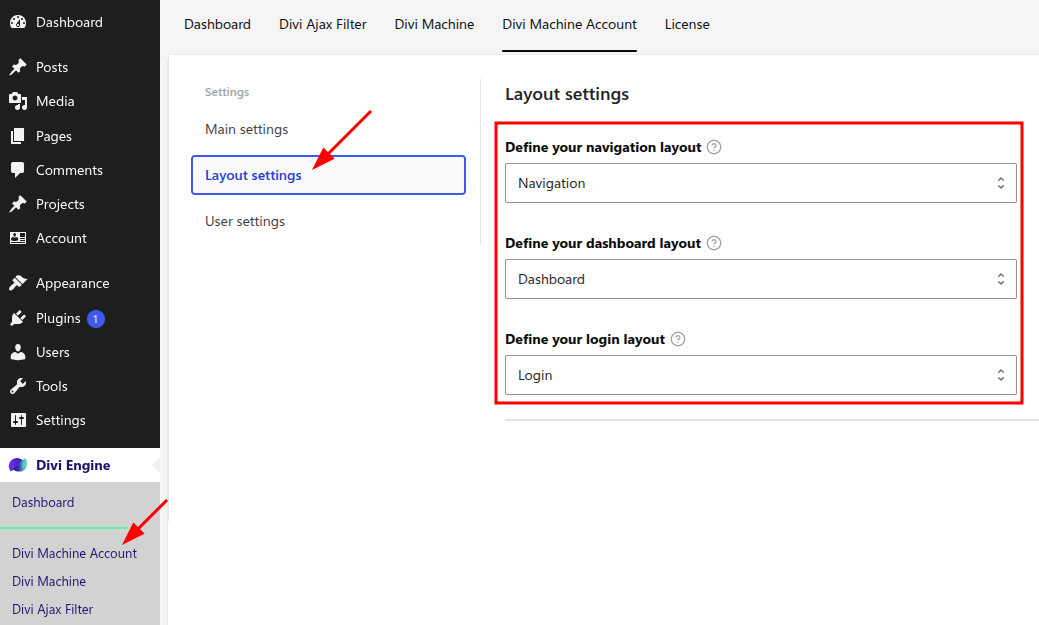
Activation creates three Account posts and selects them here. You can point each dropdown at a different account post.
| Setting | What it loads |
|---|---|
| Define your navigation layout | The menu shown to logged-in visitors. Put Acc Navigation on this post. |
| Define your dashboard layout | The page at the account URL after login. |
| Define your login layout | The page logged-out visitors see at the account URL. Put Acc Login Form and Acc Register Form on this post. |
The navigation module does not turn these three posts into extra menu items. Activation also creates Notifications, Profile, Messages, and Search Alerts. Profile appears in the menu when that post is published. Notifications, Messages, and Search Alerts stay out of the menu, and their URLs stay closed, until you turn that feature on. Any other account post you add becomes its own button. See Custom endpoints.
What's next
- Quick start — Confirm these three posts, then preview the account URL.
- Acc Navigation — Buttons for the dashboard, other account pages, and logout.