Notification Settings
Open WordPress Admin → Divi Engine → Divi Machine Account → Notifications. These options are the same on Divi 5 and Divi 4. The notification modules themselves are Divi 5 only.
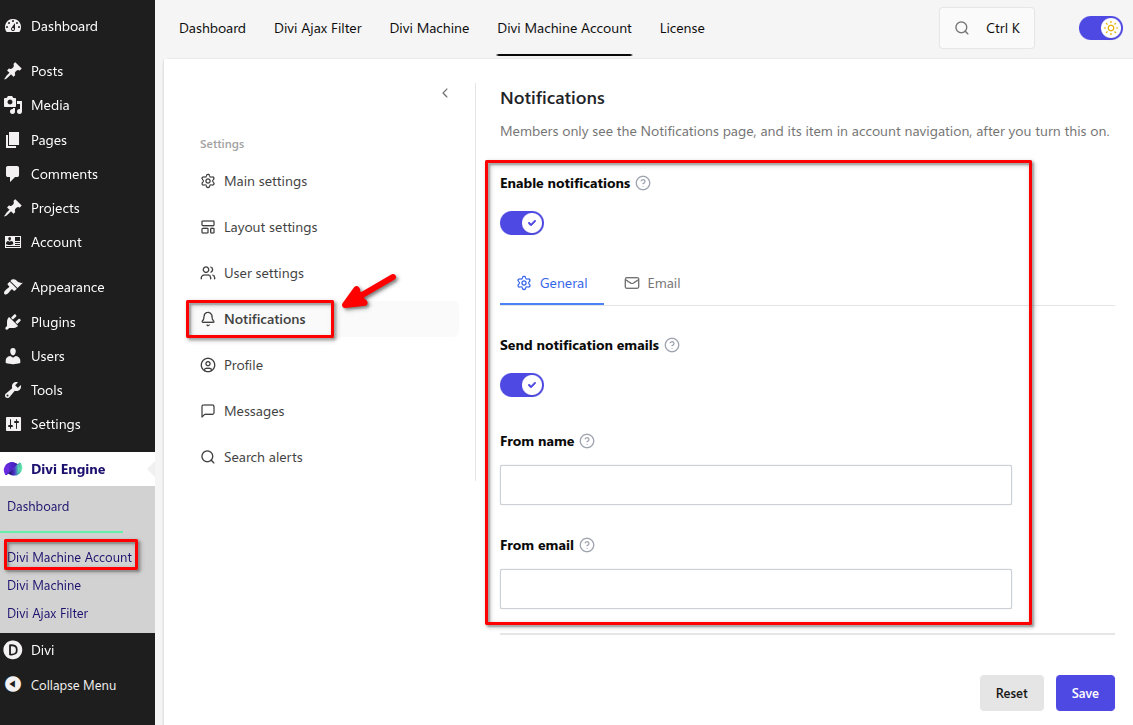
Notifications are off after install. Members do not see the Notifications account page, and it does not appear in account navigation, until you turn this on. The layout can stay published.
Enable notifications
| Option | Result |
|---|---|
| Off | The Notifications page and its menu item stay hidden. This is the default. |
| On | Members can open Notifications. The rest of this screen appears. |
Search alerts and new messages also write notifications when those features are on. They use their own email wording. This screen is the fallback email for other notifications.
General
Shown when notifications are on.
| Setting | Default | Notes |
|---|---|---|
| Send notification emails | On | Notifications that request an email are sent to the member |
| From name | Empty | Sender name. Empty uses the site name |
| From email | Empty | Sender address. Empty uses the site admin email |
Email
This is the fallback email. Search alerts and new messages use the email under Search alerts and Messages.
Leave a field blank to use the standard wording. Click a tag to insert it at the cursor. The preview uses sample details.
| Tag | Inserts |
|---|---|
{user_name} | Member name |
{user_email} | Member email |
{site_name} | Site name |
{notification_title} | Notification title |
{notification_message} | Notification message |
{notification_url} | Notification link |
The standard subject is {notification_title}. The standard message greets the member, then shows the title, the message, and a View details link.
What's next
- Notifications — The account list, the header icon, and the unread count.
- Acc Notifications — The list module.
- Acc User Icon — The header dropdown.