Message Settings
Open WordPress Admin → Divi Engine → Divi Machine Account → Messages. These options are the same on Divi 5 and Divi 4. The message modules are Divi 5 only.
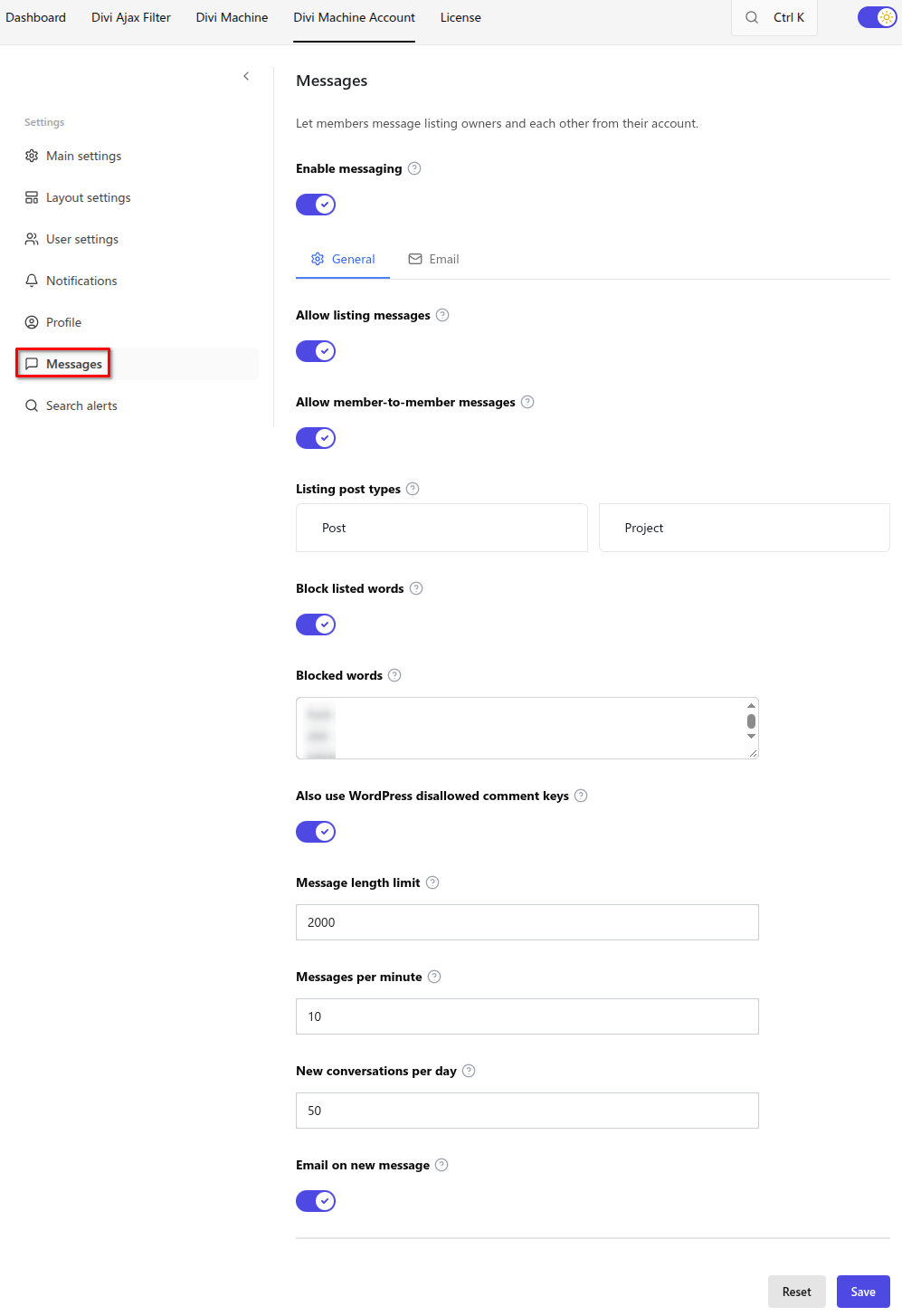
Messaging is off after install. The Messages account page, its navigation item, and the Messages item under Account in WordPress admin stay hidden until you turn this on. The layout can stay published.
Enable messaging
| Option | Result |
|---|---|
| Off | Messages stay hidden. This is the default. |
| On | Members can use Messages. The rest of this screen appears. |
General
| Setting | Default | Notes |
|---|---|---|
| Allow listing messages | On | Members can message the owner of a listing from the listing page |
| Allow member-to-member messages | On | Members can message each other from a profile or from Messages |
| Listing post types | None checked | Leave every type unchecked to allow all public post types. Check types only when you want to limit listing messages |
| Block listed words | On | A message that includes a blocked word is not sent. The sender is told it is not allowed. The blocked word is not repeated back to them |
| Blocked words | English starter list | One word or phrase per line, in any language. A blank box keeps the starter list. Saving your own list replaces that list, so leave in any starter words you still want. A word is only blocked on its own |
| Also use WordPress disallowed comment keys | On | Words already blocked for comments, under Settings → Discussion, are blocked in messages too |
| Message length limit | 2000 | Maximum characters in one message |
| Messages per minute | 10 | How many messages one member can send in a minute |
| New conversations per day | 50 | How many new conversations one member can start in a day |
| Email on new message | On | Also send an email when a member gets a new message, unless they have just been reading the conversation |
Email
Shown when Email on new message is on. Leave a field blank to use the standard wording. Click a tag to insert it at the cursor.
| Tag | Inserts |
|---|---|
{user_name} | Recipient name |
{user_email} | Recipient email |
{site_name} | Site name |
{sender_name} | Sender name |
{message_summary} | Short summary |
{message} | Message |
{conversation_url} | Conversation link |
{listing_title} | Listing title |
{listing_url} | Listing link |
The standard subject is {message_summary}. The standard message greets the member, shows the summary and the message, and links to the conversation.
What's next
- Messages — Listing messages, member messages, and the admin inbox.
- Acc Messages — The inbox module.
- Acc Message Button — The button on a listing or profile.