Search Alert Settings
Open WordPress Admin → Divi Engine → Divi Machine Account → Search alerts. These options are the same on Divi 5 and Divi 4. Acc Save Search and Acc Saved Searches are Divi 5 modules.
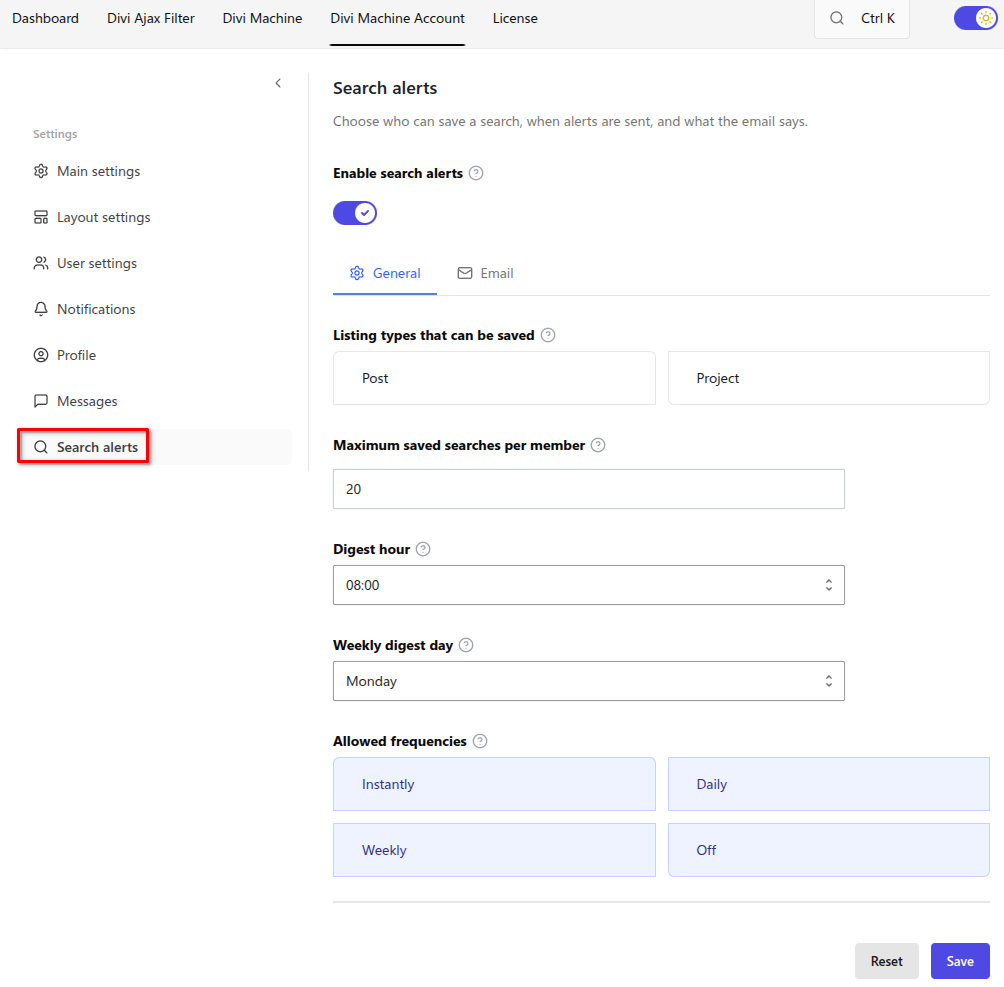
Search alerts are off after install. The Search Alerts account page and its navigation item stay hidden until you turn this on. The layout can stay published. The other alert settings stay hidden until then.
Search alerts need Divi Ajax Filter so the current filters can be saved and matched later. Divi Machine includes Ajax Filter. Notifications should also be on, because a new match is stored as an on-site notification as well as an email.
Enable search alerts
| Option | Result |
|---|---|
| Off | Search Alerts stay hidden. This is the default. |
| On | Members can save a search. The rest of this screen appears. |
General
| Setting | Default | Notes |
|---|---|---|
| Listing types that can be saved | None checked | Leave every type unchecked to allow all listing types, including products. Check types only when you want to limit alerts |
| Maximum saved searches per member | 20 | A member cannot save more than this many searches |
| Digest hour | 08:00 | Daily and weekly alerts are sent once in this hour, using the site timezone |
| Weekly digest day | Monday | Weekly alerts are sent on this day, at the digest hour |
| Allowed frequencies | Instantly, Daily, Weekly, and Off | Frequencies a member can choose when they save a search or manage alerts |
Off lets a member keep the search without email. They can still open it from the account page.
Email
This email is only the alert email. The short notice in the account stays the same. Leave a field blank to use the standard wording. The site name stays at the bottom of the email. Click a tag to insert it at the cursor.
| Tag | Inserts |
|---|---|
{user_name} | Member name |
{user_email} | Member email |
{site_name} | Site name |
{search_name} | Search name |
{match_count} | Number of matches |
{match_summary} | A sentence such as "2 new matches" |
{matches} | Up to 10 new listings |
{results_url} | Results link |
{account_url} | Account link |
{unsubscribe_url} | Link that turns this alert off |
The standard subject is New listings for "{search_name}". Keep {matches} in the message if you want the new listings in the email. A member can also turn an alert off from the link in the email, in one click.
What's next
- Search alerts — Save a filtered search and manage alerts.
- Acc Save Search — The button on a filter page.
- Acc Saved Searches — The account list.