Acc Messages
Divi 5 only
Acc Messages is a Divi 5 module. There is no Classic Builder version.
Purpose and when to use
Acc Messages is the member inbox. It lists conversations, opens one, and lets the member reply, start a new message, archive, or block. Place it on the Messages account post. Activation already places one there.
The page stays hidden until messaging is turned on. Logged-out visitors see nothing.
Choosing a member in New message opens that conversation with the reply box ready. If they already have a conversation, that conversation opens. There is no extra browser prompt.
Before you configure this module
- Enable messaging is on.
- You are editing the Messages account post in the Visual Builder.
Quick setup
- Add Acc Messages, or select the one already on Messages.
- Adjust the empty states and button labels if the defaults do not fit the site.
- On the Design tab, style the shared Buttons group, then override New message, Back, Send, Archive, or Block when one button should look different.
Content tab
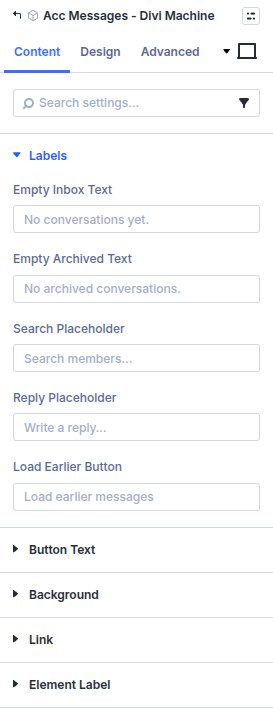
Labels
| Setting | Default |
|---|---|
| Empty inbox text | No conversations yet. |
| Empty archived text | No archived conversations. |
| Search placeholder | Search members… |
| Reply placeholder | Write a reply… |
| Load earlier button | Load earlier messages |
Button text
| Setting | Default | Notes |
|---|---|---|
| New message | New message | |
| Back | Back | |
| Send | Send | |
| Archive | Archive | |
| Move to inbox | Move to inbox | Shown on the archive button while viewing an archived conversation |
| Archived | Archived | Opens archived conversations |
| Inbox | Inbox | Returns from archived conversations |
| Block | Block | |
| Unblock | Unblock | Shown after this member is blocked |
Design tab
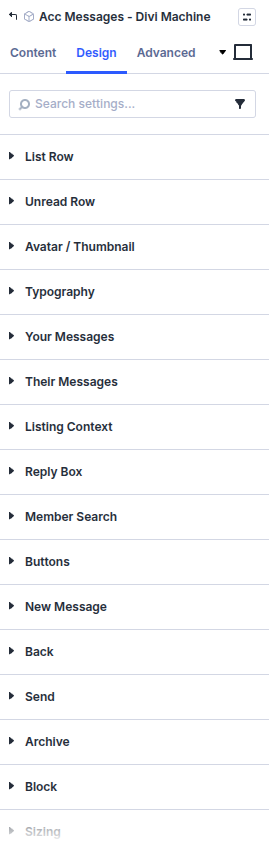
Message boxes use the same field styling as other Divi form fields. Buttons is the shared style. The named button groups override that style for one button.
| Group | What it configures |
|---|---|
| List row | A conversation in the inbox |
| Unread row | A conversation with unread messages |
| Avatar / thumbnail | The member photo or listing image |
| Typography | Inbox text |
| Your messages | Messages the member sent |
| Their messages | Messages they received |
| Listing context | The listing a conversation is about |
| Reply box | The reply field |
| Member search | The search used in New message |
| Buttons | Shared button style |
| New message, Back, Send, Archive, Block | Style for that button |
| Sizing, spacing, border, box shadow, filters, animation, transform | Module chrome |
What's next
- Messages — Listing messages, member messages, and the admin screen.
- Acc Message Button — Start a conversation from a listing or profile.