Acc Notifications
Divi 5 only
Acc Notifications is a Divi 5 module. There is no Classic Builder version.
Purpose and when to use
Acc Notifications lists the logged-in member's notifications. Place it on the Notifications account post. Activation already places one there.
The list stays empty, and the account page stays hidden, until notifications are turned on. Logged-out visitors see nothing.
Before you configure this module
- Enable notifications is on.
- You are editing the Notifications account post in the Visual Builder.
Quick setup
- Add Acc Notifications, or select the one already on Notifications.
- Set Items per page (default 10).
- Set Empty text (default No notifications yet.) and Mark all button text (default Mark all as read).
- Style the rows and the button on the Design tab.
Content tab
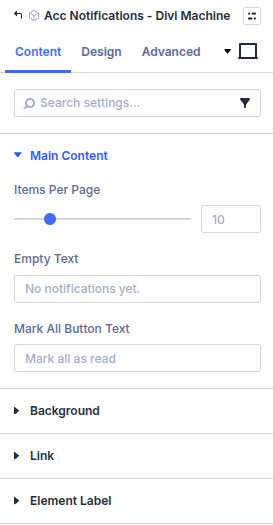
| Group | What it configures |
|---|---|
| Main Content | How many items, empty text, and the mark-all label |
| Background / Link / Admin Label | Standard Divi groups |
| Setting | Type | Default | Notes |
|---|---|---|---|
| Items per page | number | 10 | How many notifications to show on each page. Range 1–50 |
| Empty text | text | No notifications yet. | Shown when the member has no notifications |
| Mark all button text | text | Mark all as read | Marks every notification as read |
Design tab
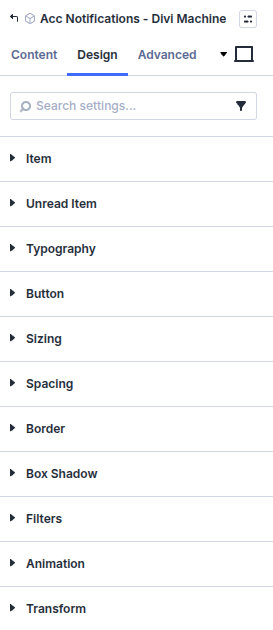
| Group | What it configures |
|---|---|
| Item | A notification row |
| Unread item | A row that has not been opened |
| Typography | Text in the list |
| Button | The mark-all button |
| Sizing, spacing, border, box shadow, filters, animation, transform | Module chrome |
What's next
- Notifications — Email, the header icon, and the unread count.
- Acc User Icon — Recent notifications in the header.
- Acc Navigation — Optional unread count on a menu item.