Coupons
Purpose and when to use
Coupons let you offer percentage or fixed discounts on membership signups (and optionally on renewals). You configure the discount, which plans it applies to, usage limits, and expiration. Members enter the coupon on the Register or Signup module; the discount appears in the order summary. Coupon usage is reported under Divi Membership → Reports → Coupons, and you can export data via CSV.
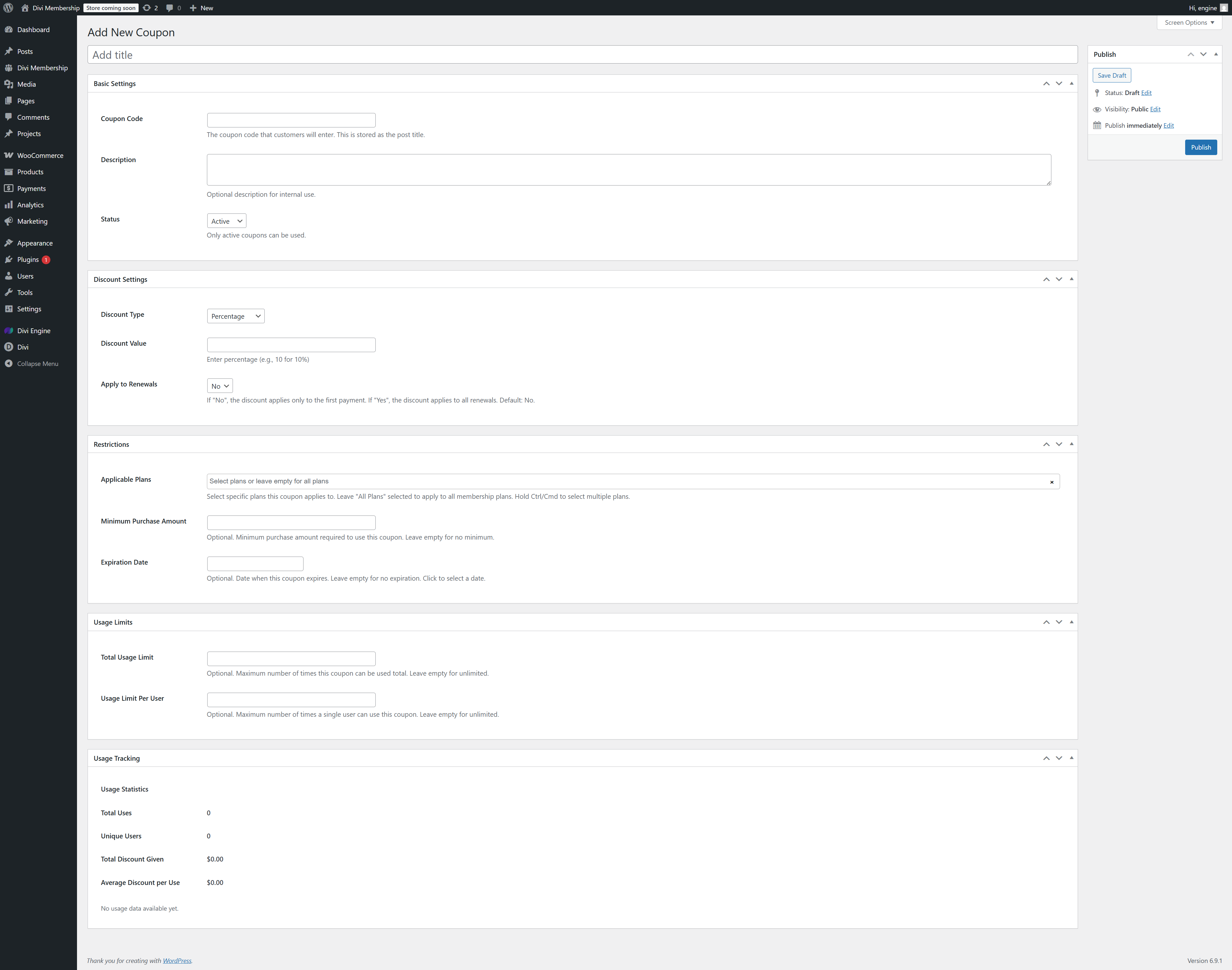
Where to create coupons
Go to Divi Membership → Coupons in the WordPress admin. Click Add New Coupon to create one, or click an existing coupon to edit. The form is split into collapsible sections: Basic Settings, Discount Settings, Restrictions, Usage Limits, and Usage Tracking. Use Publish (or Update) in the right sidebar to save.
Basic Settings
- Add title — This is the coupon code that customers enter (e.g.
SAVE20). It is stored as the post title. - Description — Optional description for internal use only; not shown to customers.
- Status — Active or Inactive. Only active coupons can be used. Set to Inactive to disable a coupon without deleting it.
Discount Settings
- Discount Type — Percentage (e.g. 10% off) or Fixed Amount (e.g. $50 off).
- Discount Value — For percentage, enter the number (e.g.
10for 10%). For fixed amount, enter the currency amount. - Apply to Renewals — No (default): the discount applies only to the first payment. Yes: the discount applies to all renewals. Use Yes for ongoing loyalty discounts.
Restrictions
- Applicable Plans — Select one or more membership plans, or leave All Plans selected so the coupon applies to any plan. Hold Ctrl/Cmd to select multiple plans. If a member selects a plan the coupon does not apply to, they see an error.
- Minimum Purchase Amount — Optional. Minimum purchase amount required to use this coupon. Leave empty for no minimum.
- Expiration Date — Optional. Date when the coupon stops working. Leave empty for no expiration. Click the field to open the date picker.
Usage Limits
- Total Usage Limit — Optional. Maximum number of times this coupon can be used in total across all users. Leave empty for unlimited.
- Usage Limit Per User — Optional. Maximum number of times a single user can use this coupon. Leave empty for unlimited.
Usage Tracking
The Usage Statistics section is read-only and shows how the coupon has been used:
- Total Uses — Number of times the coupon has been applied.
- Unique Users — Number of distinct users who used it.
- Total Discount Given — Sum of all discounts applied.
- Average Discount per Use — Average discount per redemption.
For a new coupon, these show zero or “No usage data available yet” until the coupon is used.
Register and Signup modules
The Register and Signup Form modules include a coupon field. When the member enters a valid coupon, the order summary updates to show the discounted price. Coupons can persist in the browser when the member switches plans so they do not have to re-enter the code.
Reports and CSV export
- Divi Engine → Divi Membership → Reports has a Coupons tab showing coupon usage over time.
- Use CSV export (from the Reports or Coupons area) to download coupon usage data for analysis or accounting.
What's Next
- Reporting — Revenue, Signups, and Coupons reports and charts.
- Register module — Add a registration form with coupon support.
- Signup module — Let existing users subscribe with a coupon.