Free Trials
Purpose and when to use
Free trials let you offer a trial period before the first paid charge. Global trial settings (behavior, grace period, abuse prevention) are configured on the Free Trials page; per-plan trial duration and whether to require payment upfront are set on each membership plan’s billing cycle. Trials work with Stripe and PayPal. Members see trial status in their account and in the admin; they can Cancel trial or Start paid now when allowed.
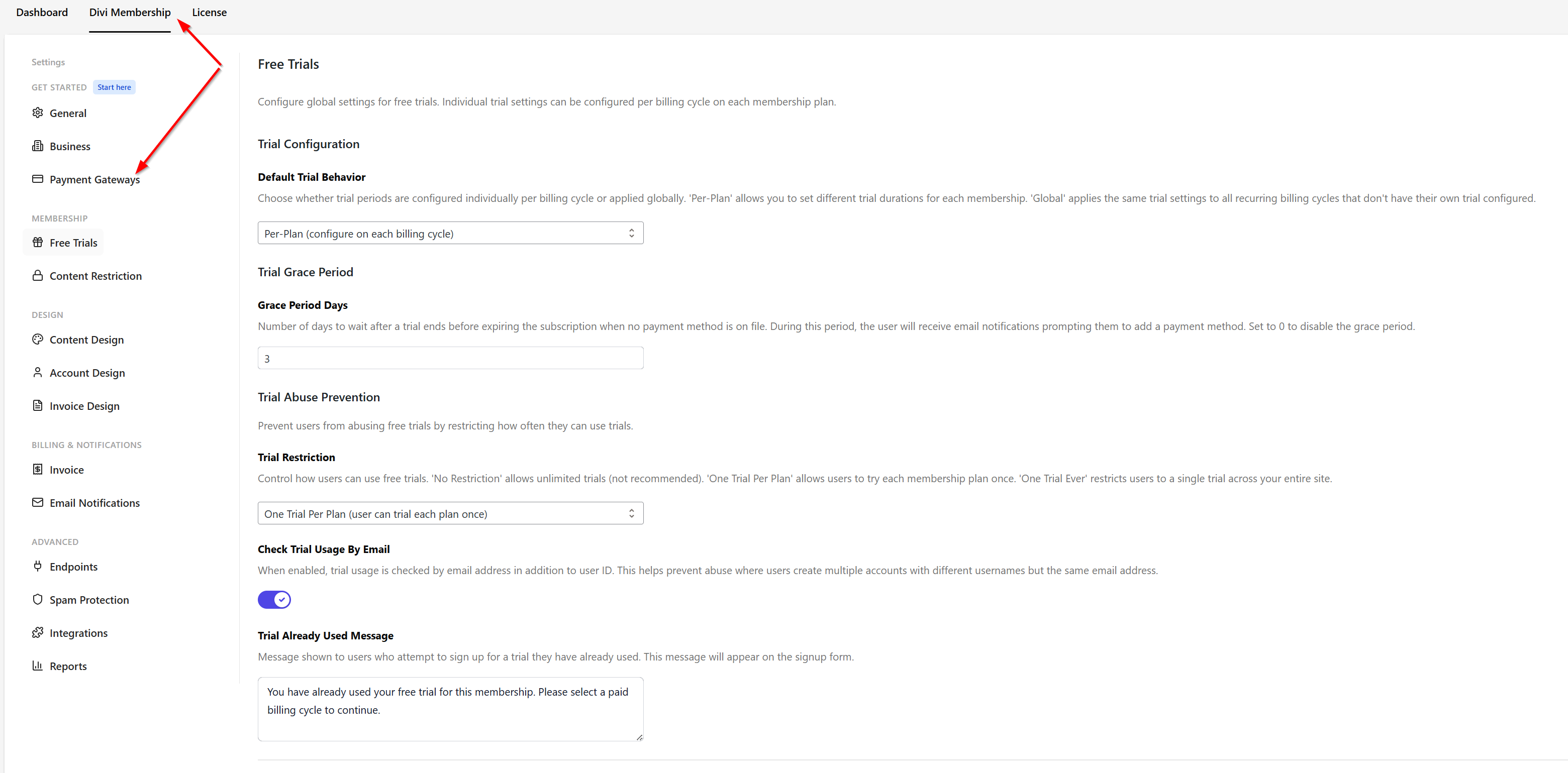
Where to configure trials
Go to Divi Engine → Divi Membership → Free Trials. The page has three areas: Trial Configuration, Trial Grace Period, and Trial Abuse Prevention. Individual trial duration and “require payment upfront” are configured per billing cycle on each membership plan, not on this page.
Trial Configuration
Default Trial Behavior controls whether trial periods are configured per billing cycle or applied globally.
- Per-Plan (configure on each billing cycle) — Set different trial duration and payment-upfront options per billing cycle on each membership plan. Use this when some plans or cycles have trials and others do not.
- If a global option is available in your version, it applies the same trial behavior across plans; check the dropdown for the exact label.
Trial Grace Period
Grace Period Days is the number of days to wait after a trial ends before expiring the subscription when no payment method is on file. During this period the user typically keeps access so they can add a card and convert to paid. After the grace period, the subscription expires if they have not added a payment method. This applies when you do not require payment upfront at trial start.
Trial Abuse Prevention
These settings limit how often users can use free trials.
Trial Restriction
- No Restriction — Users can start a trial multiple times (not recommended; easy to abuse).
- One Trial Per Plan — A user can trial each plan once. They can still trial other plans they haven’t used yet.
Check Trial Usage By Email — When enabled, trial usage is checked by email address as well as user ID. This reduces abuse from users creating multiple accounts with the same email to get repeated trials.
Trial Already Used Message — Message shown on the signup form when a user tries to start a trial they have already used (for that plan). Default text is along the lines of: “You have already used your free trial for this membership. Please select a paid billing cycle to continue.” You can edit this to match your tone.
Per-plan trial settings
On each membership plan, for each billing cycle, you can set:
- Trial duration (e.g. 7 days, 14 days).
- Require payment upfront — When enabled, a payment method is collected at signup and charged when the trial ends; when disabled, no card is required during the trial (grace period applies if no card is added by the end of the trial).
Trial status in account and admin
- Member account — Members on a trial see their trial status and end date, and may see Cancel trial or Start paid now.
- Admin — Under Divi Engine → Divi Membership → Subscriptions, trial status is visible so you can see who is on trial and when it converts or ends.
Trial emails
Configure trial-related emails (e.g. trial started, trial ending soon, trial converted) under Divi Engine → Divi Membership → Email Notifications. Trial reminders and conversion notices help reduce failed charges and improve engagement.
What's Next
- Account page — Where members see trial status and use Cancel trial / Start paid now.
- Subscription management — View trial status and subscriptions in the admin.
- Email notifications — Configure trial and other membership emails.
- Register module — Offer plans with trials on the registration form.