Module Conditions
Purpose and when to use
Module conditions let you show or hide Divi elements (modules, sections, rows) based on whether the visitor has access to protected content. Use them to tailor the experience for members vs non-members—for example, to show signup or upsell content only to users without access, or to hide a module when the visitor cannot view the page. These settings live under the Advanced tab, in the Conditions section, on any module, section, or row.
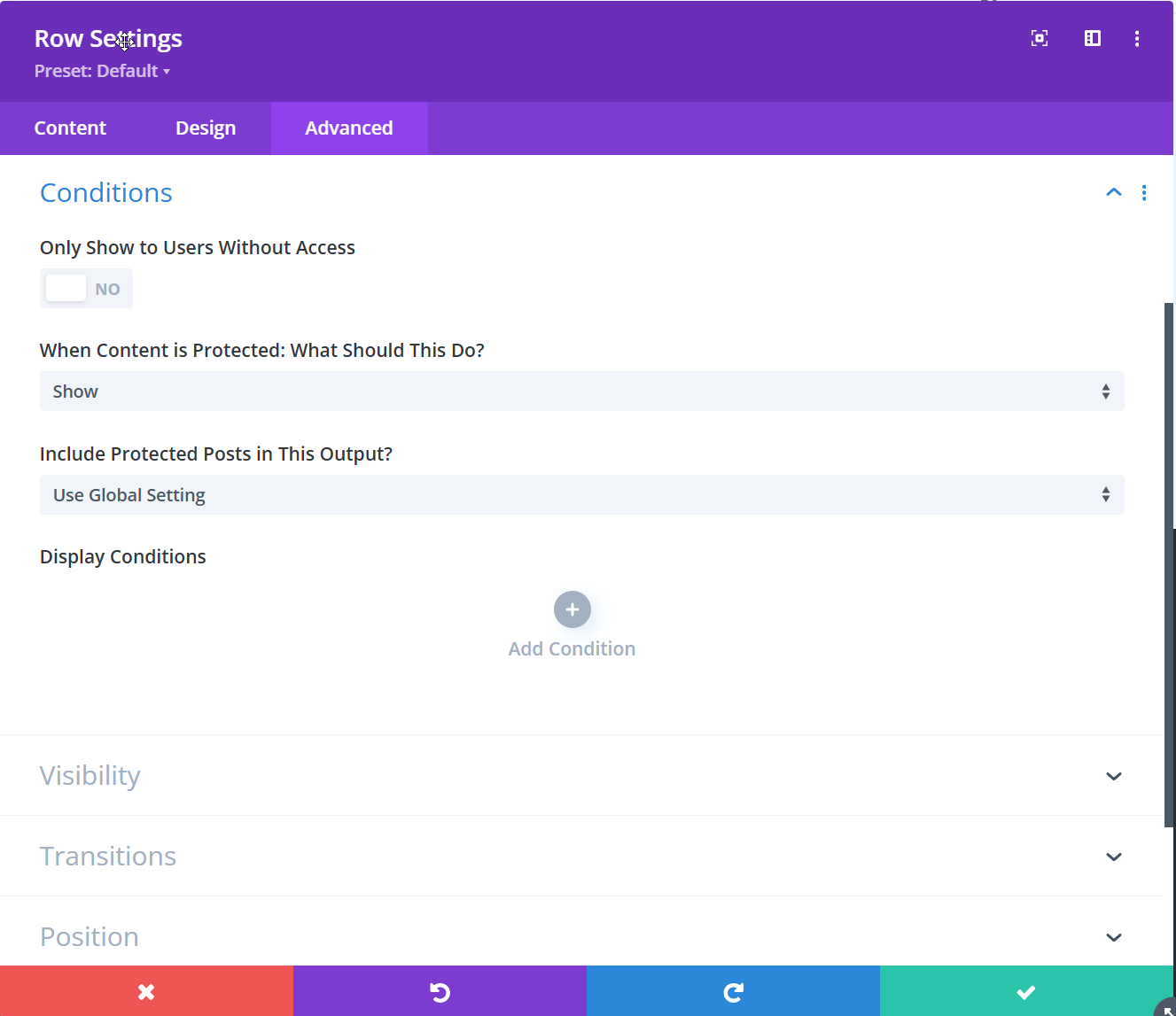
The Conditions section includes Divi Membership options (described below) and Divi’s own Display Conditions (Add Condition) for other visibility rules. This page documents only the membership-related options.
Only Show to Users Without Access
Toggle (No / Yes) that controls whether the element is visible when the visitor has access to the protected content.
- No (default) — The element can be shown to everyone, subject to the “When Content is Protected” setting for users without access.
- Yes — The element is hidden from users who can access the protected content. Use this for promos, upsells, or signup blocks that you want to show only to visitors who do not have access (e.g. on a protected page, only non-members see the CTA).
When Content is Protected: What Should This Do?
Dropdown that controls what happens to this module, section, or row when the visitor does not have access to the page.
- Show (default) — The element is still displayed. Use when the element itself is safe for non-members (e.g. a message or signup form).
- Hide — The element is not displayed to users without access.
- Hide with Custom Text — The element is replaced by custom content (a Custom Content field appears below). Use this to show a tailored message or CTA instead of the module’s normal output.
Include Protected Posts in This Output?
Dropdown that controls whether protected posts are included in the output of this module. It applies to blog, shop loop, filter loop, archive loop, and carousel modules (and others that list posts). It overrides or follows the global rule set in Divi Engine → Divi Membership → Content Restriction.
- Use Global Setting (default) — Follow the site-wide content restriction setting.
- Include Protected Posts in This Output? — This loop/list shows protected posts (e.g. so members see them).
- Exclude Protected Posts from This Output? — This loop/list excludes protected posts.
This setting affects what posts appear in the query; the “Only Show to Users Without Access” and “When Content is Protected” settings affect whether the whole module is shown or replaced for the current visitor.
Display Conditions (Divi)
The Display Conditions area with Add Condition is part of Divi’s built-in visibility system (e.g. by device, user role, or date). It is separate from the Divi Membership options above. You can combine both: use Divi’s conditions for layout/device rules and the membership options for access-based show/hide.
Changes to these settings can affect the live site immediately. Preview or test in a staging environment before applying to production.
What's Next
- Account page — Member-facing account and membership area.
- Content Restriction — Global rules for protected content and archives.
- Register module — Add signup forms with plan selection.