Email Notifications
Purpose and when to use
Divi Membership sends transactional emails for key events (registration, renewal, expiration, and trials). You can enable or disable each notification and customize subject lines and content using merge tags. Access these in Divi Engine → Divi Membership → Email Notifications. HTML is supported in templates; keep it simple for best deliverability.
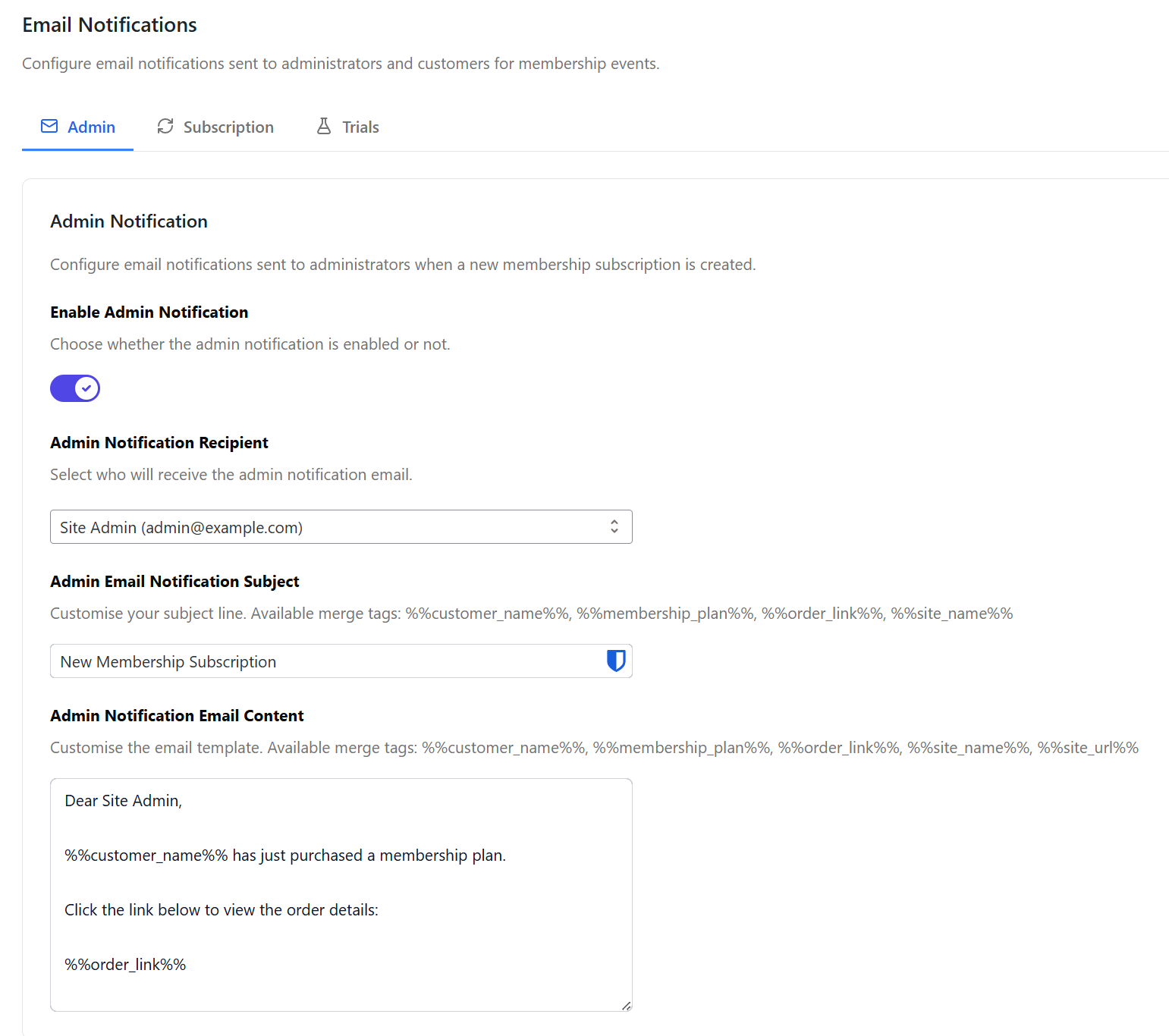
How settings are organized
The Email Notifications screen is split into three tabs:
- Admin — Notification sent to you when a new member registers.
- Subscription — Customer-facing emails for welcome, upcoming renewal, expired, and expired reminder.
- Trials — Emails for trial lifecycle events (started, ending soon, converted, expired, grace period).
Use the tabs to jump to the group you want to configure.
Admin notification
Sent when a member registers successfully. Can go to the site admin email or to one or more custom addresses (comma-separated).
Merge tags: %%customer_name%%, %%membership_plan%%, %%order_link%% (link to the subscription in WP Admin), %%site_name%%, %%site_url%%.
Subscription notifications
Customer welcome notification
Sent to the user after successful registration. Customize subject and body with merge tags.
Merge tags: %%customer_name%%, %%membership_plan%%, %%login_link%% (from Divi Engine → Divi Membership → Endpoints), %%site_name%%, %%site_url%%.
Upcoming renewal notification
Reminds the customer of their upcoming renewal. Configure how many days before renewal to send (e.g. 30).
Merge tags: %%customer_name%%, %%membership_plan%%, %%renewal_date%%, %%login_link%%, %%site_name%%, %%site_url%%.
Membership expired notification
Sent on the day the membership expires.
Merge tags: %%customer_name%%, %%membership_plan%%, %%expired_date%%, %%login_link%%, %%site_name%%, %%site_url%%.
Membership expired reminder notification
Sent a configurable number of days after the membership has expired.
Merge tags: %%customer_name%%, %%membership_plan%%, %%expired_date%%, %%login_link%%, %%site_name%%, %%site_url%%.
Trial notifications
These appear in the Trials tab and apply when you use free trials.
Trial started notification
Sent when a customer starts a free trial.
Merge tags: %%site_name%%, %%customer_name%%, %%membership_plan%%, %%trial_end_date%%, %%site_url%%, %%login_link%%.
Trial ending soon notification
Sent a configurable number of days before the trial ends (e.g. 3 or 7).
Merge tags: %%site_name%%, %%customer_name%%, %%membership_plan%%, %%trial_end_date%%, %%days_remaining%%, %%site_url%%, %%login_link%%.
Trial converted notification
Sent when a trial successfully converts to a paid subscription.
Merge tags: %%site_name%%, %%customer_name%%, %%membership_plan%%, %%next_payment_date%%, %%site_url%%, %%login_link%%.
Trial expired notification
Sent when a trial expires without converting to a paid subscription.
Merge tags: %%site_name%%, %%customer_name%%, %%membership_plan%%, %%site_url%%, %%login_link%%.
Trial grace period notification
Sent when a trial ends but no payment method is on file, prompting the user to add one.
Merge tags: %%site_name%%, %%customer_name%%, %%membership_plan%%, %%grace_end_date%%, %%days_remaining%%, %%site_url%%, %%login_link%%, %%account_link%%.
What's Next
- Account page — Where members land after registration and manage their membership.
- Free trials — Trial-related emails and behaviour.
- Settings — Where to find Email Notifications and all other sections.