Subscription Management
Purpose and when to use
Subscription management covers both the WordPress admin view of subscriptions and the member account actions (renew, cancel, resubscribe, switch plan). Use the admin to view trial status, cancel or refund memberships, and support members; use the account so members can self-serve.
Subscriptions list in admin
- Go to Divi Membership → Subscriptions.
- You see a list of all subscriptions: Email, Start Date, Membership Plan, Billing Cycle, Status, and Payment Method.
- Trial status is visible in the admin so you can see which members are on a trial, when it ends, and whether they have started paid or not.
Click into any subscription to see full details, transaction history, and available actions.
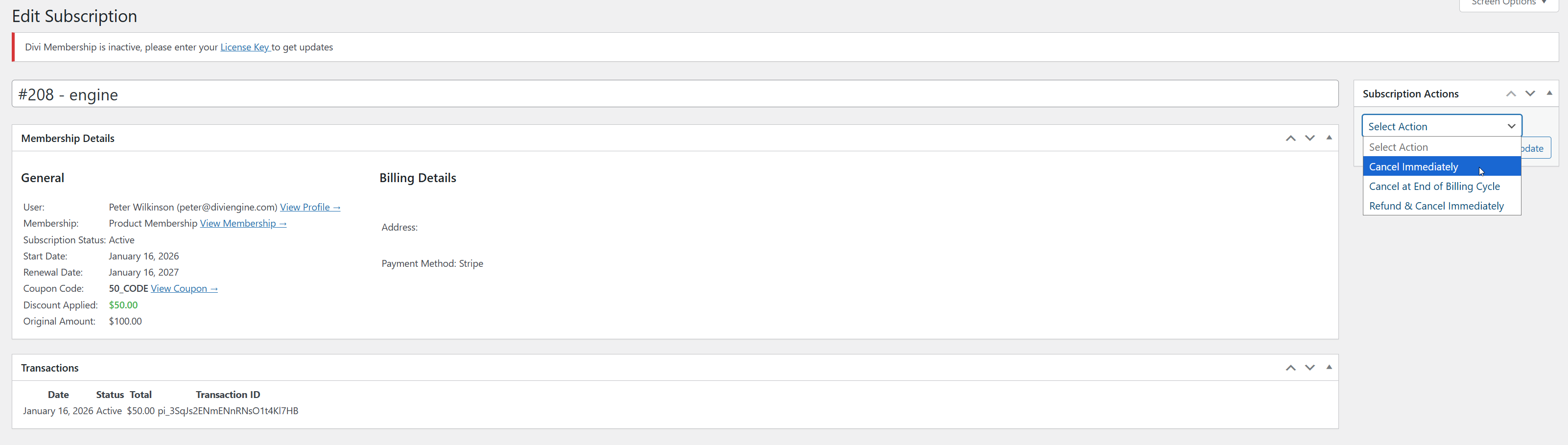
Where to find Subscription Actions
The Subscription Actions box is in the right sidebar of the Edit Subscription screen (not in the main content with Membership Details and Transactions). If you don’t see it:
- Look for the Subscription Actions panel on the right side of the page.
- Use Screen Options (top right of the screen) and ensure Subscription Actions is checked so the sidebar box is visible.
The dropdown in that box only shows cancel/refund options when the subscription status is Active. For other statuses it shows "No Available Actions".
Cancelling a subscription
On an individual subscription, open the Subscription Actions box in the right sidebar. In the dropdown choose Cancel Immediately or Cancel at End of Billing Cycle, then click Update to apply. Cancel immediately ends the membership right away; cancel at end of billing cycle keeps access until the current period ends.
Refunding a subscription
In the Subscription Actions box (right sidebar), choose Refund & Cancel Immediately from the dropdown and click Update to refund and cancel the membership immediately.
Resubscribe and switch plan (member account)
Members can Resubscribe after cancelling (same flow as Renew) and Switch plan (upgrade/downgrade or same-plan cycle change) from their account membership page. See Account page for upgrade/downgrade and resubscribe behaviour.
Reports
For revenue, signups, and coupon usage over time, use Divi Engine → Divi Membership → Reports. See Reporting for details.
What's Next
- Account page — Plan switcher, resubscribe, cancel modal, and card management.
- Reporting — Revenue, Signups, and Coupons reports.
- Free trials — Configure trials and trial status in account and admin.