Acc Edit Account
Divi 5 only
Acc Edit Account is a Divi 5 module. There is no Classic Builder version.
Purpose and when to use
Acc Edit Account is the form a logged-in member uses to update their own account. It can include name and email, profile fields, a photo, a password change, and a choice to stay visible to other members. Place it on the Profile account post. Activation already places one there.
Logged-out visitors see nothing.
Which profile fields appear, which are required, and the largest photo size come from Profile settings.
Before you configure this module
- Profile settings list the fields you want members to edit.
- You are editing the Profile account post in the Visual Builder.
Quick setup
- Add Acc Edit Account, or select the one already on Profile.
- Leave Show account details, Show profile fields, and Show password fields on unless you want one of those blocks hidden.
- Set Field columns to 1 column, 2 columns, or 3 columns. The default is 2 columns.
- Set Button text (default Save changes) and Success text (default Your account has been updated.).
What the member sees
- Account details: first name, last name, display name, and email.
- Profile fields: the fields enabled in Profile settings, including the photo when Photo is enabled.
- Password: current password, new password, and confirm new password. With two columns, the current password sits on its own row and the two new passwords sit side by side.
- Visible to other members: other members can see this profile and find this member in Messages. Turning it off hides the profile. Conversations that already exist stay open. Existing members stay visible until they turn this off.
Photo and Bio stay full width. Other short fields follow Field columns.
Content tab
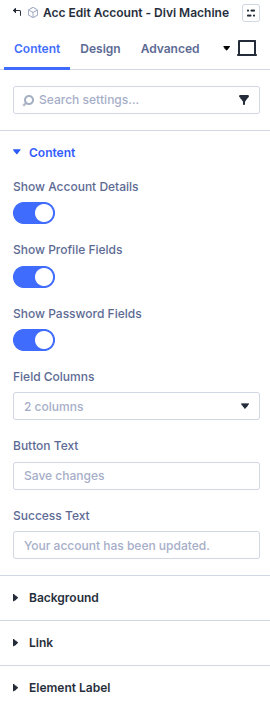
| Group | What it configures |
|---|---|
| Content | Which blocks show, column count, button, and success message |
| Background / Link / Admin Label | Standard Divi groups |
| Setting | Type | Default | Notes |
|---|---|---|---|
| Show account details | toggle | On | Name and email |
| Show profile fields | toggle | On | Fields from Profile settings, including the photo |
| Show password fields | toggle | On | Current, new, and confirm password |
| Field columns | select | 2 columns | 1 column, 2 columns, or 3 columns. Photo and Bio stay full width |
| Button text | text | Save changes | |
| Success text | text | Your account has been updated. | Shown after a successful save |
Design tab
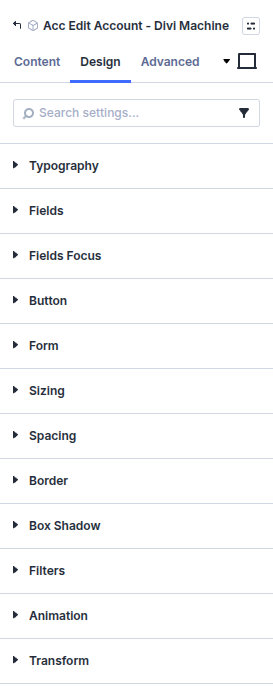
| Group | What it configures |
|---|---|
| Typography | Labels and other form text |
| Fields | Field text, spacing, and background |
| Fields Focus | Focus background and focus text |
| Button | The save button |
| Sizing, spacing, border, box shadow, filters, animation, transform | Module chrome |
What's next
- Profile — Settings and the public profile.
- Acc Profile — Show this member's public fields on a listing or author page.